> ## Documentation Index
> Fetch the complete documentation index at: https://docs.embedder.com/llms.txt
> Use this file to discover all available pages before exploring further.
# Common Workflows
Practical workflows for setting up projects, interacting with hardware, writing firmware, debugging, and managing sessions. Each section includes example prompts you can adapt.
## Start a new project
```txt embedder theme={"system"}
/project
```
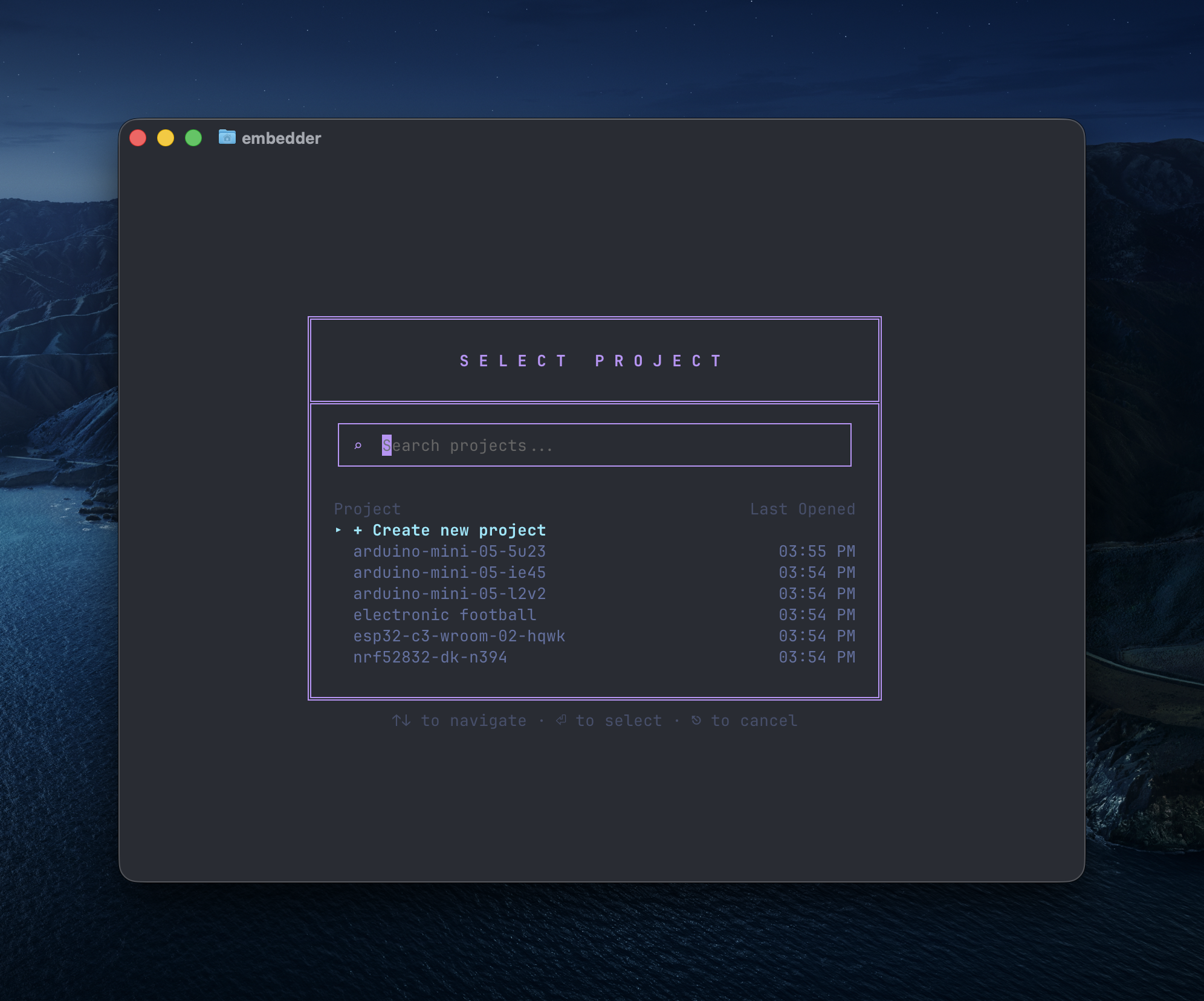 Choose an existing project or create a new one.
Embedder will prompt you to create a new project automatically if no project is associated with the directory you run it in, so note that running `/project` is not always needed.
Select the platform you're using from our catalog, or add your own.
Choose an existing project or create a new one.
Embedder will prompt you to create a new project automatically if no project is associated with the directory you run it in, so note that running `/project` is not always needed.
Select the platform you're using from our catalog, or add your own.
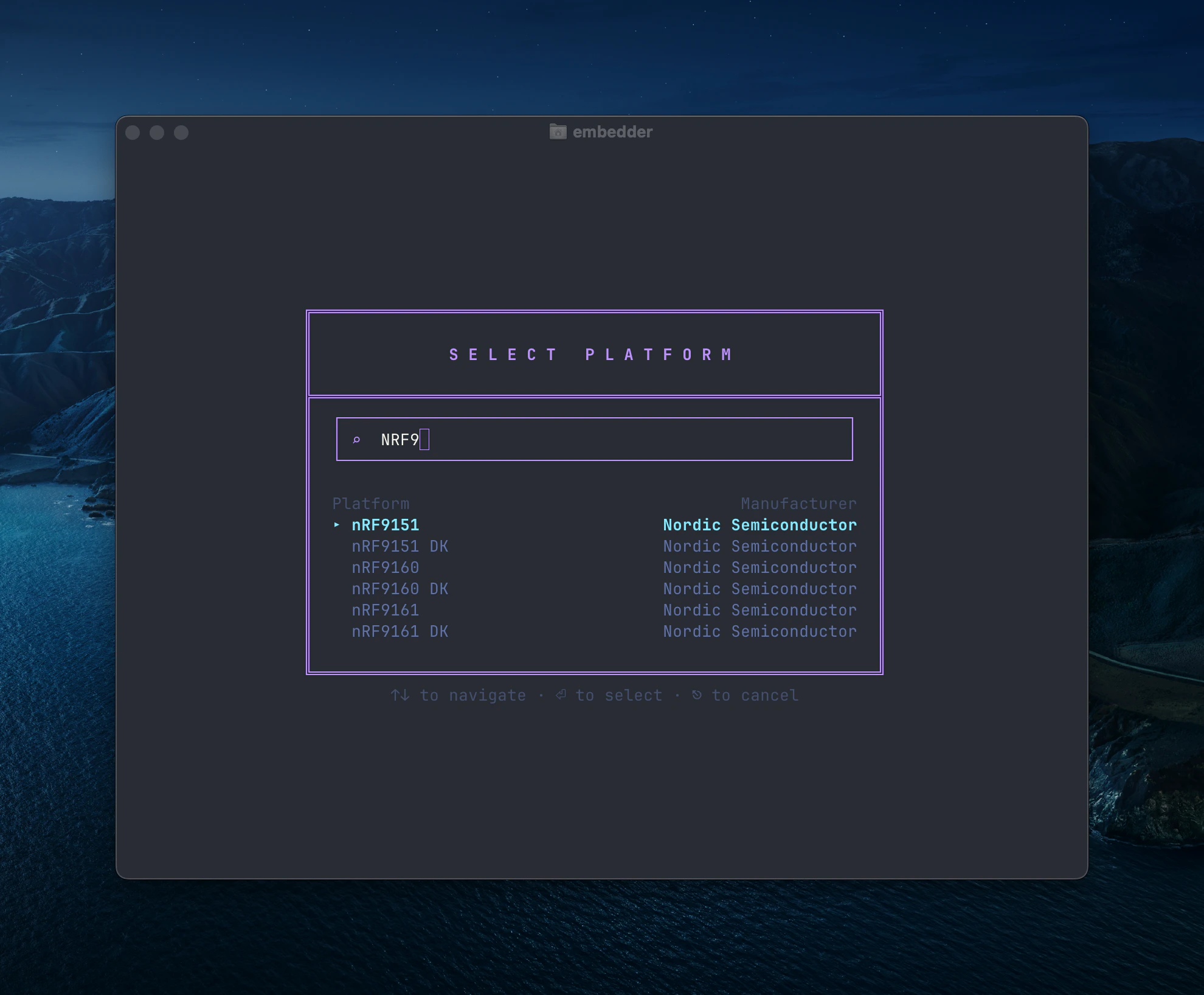 To add your own platform, type the name of the platform and press the `+ Add "[platform name]"` button. You will then be prompted to upload your documentation.
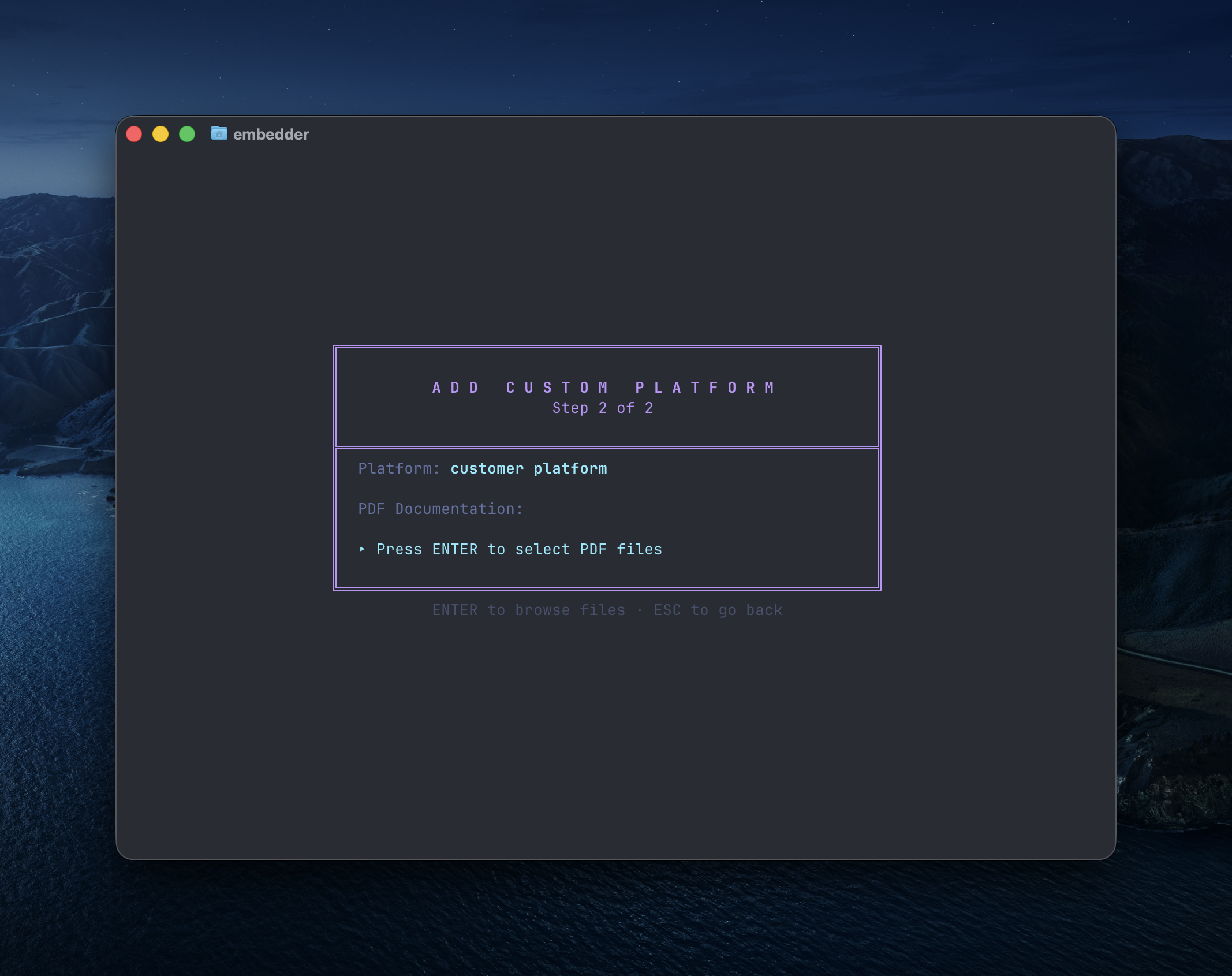 See [Add a Peripheral](/core-concepts/add-peripheral) for the full walkthrough on selecting from the catalog and uploading custom peripherals with their datasheets.
```txt embedder theme={"system"}
/init
```
Creates an `EMBEDDER.md` file with your projects context, configuration, and more.
For devices not included in the catalogue, upload your own documentation or datasheets via `/peripheral` or through the web console (`/console`) to improve the agent's performance.
## Hardware interaction
### Use the serial monitor
The serial terminal is integrated directly into Embedder. The AI reads serial output automatically.
**Open the serial sidebar:**
```txt Embedder theme={"system"}
/serial
```
Or use the keyboard shortcut: `` Ctrl+` `` (backtick)
**Auto-connect behavior:**
By default, Embedder auto-connects to your device after flashing
To disable auto-connect, update your `EMBEDDER.md` or prompt:
```txt Embedder theme={"system"}
> don't auto-connect to serial after flashing
```
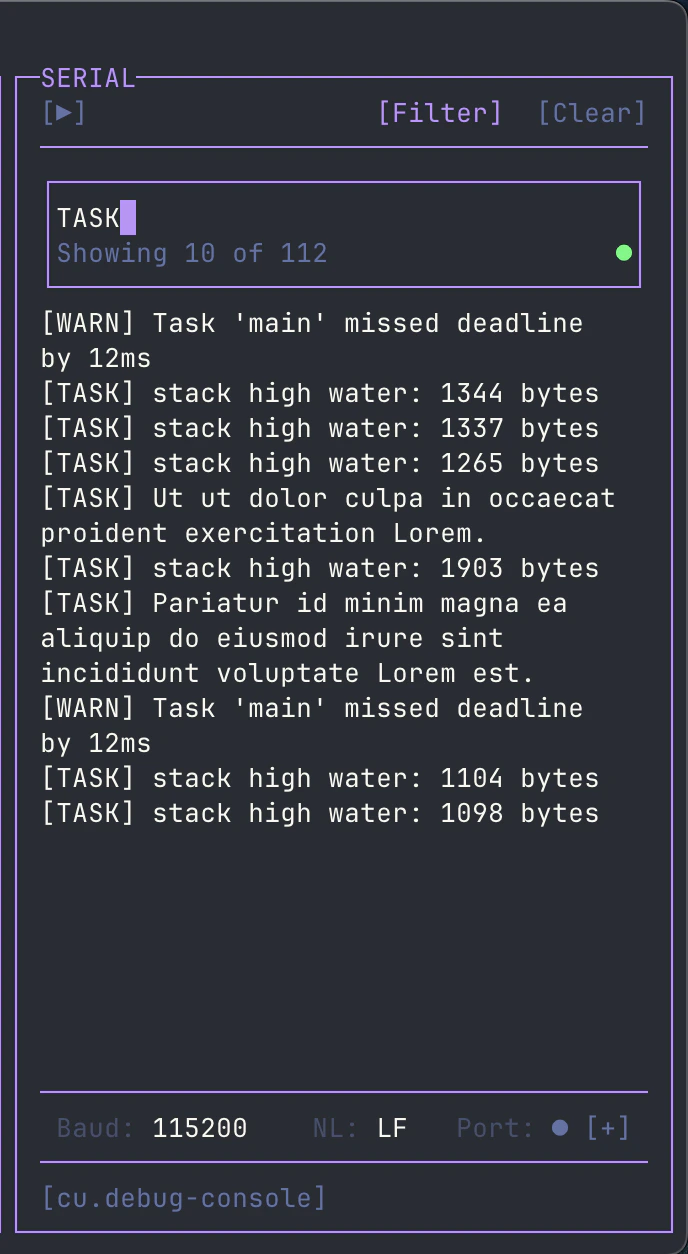
**Filter serial output:** Click `[Filter]` in the serial toolbar to filter output by regex pattern. Useful for isolating specific log messages or errors from noisy output.
See [Add a Peripheral](/core-concepts/add-peripheral) for the full walkthrough on selecting from the catalog and uploading custom peripherals with their datasheets.
```txt embedder theme={"system"}
/init
```
Creates an `EMBEDDER.md` file with your projects context, configuration, and more.
For devices not included in the catalogue, upload your own documentation or datasheets via `/peripheral` or through the web console (`/console`) to improve the agent's performance.
## Hardware interaction
### Use the serial monitor
The serial terminal is integrated directly into Embedder. The AI reads serial output automatically.
**Open the serial sidebar:**
```txt Embedder theme={"system"}
/serial
```
Or use the keyboard shortcut: `` Ctrl+` `` (backtick)
**Auto-connect behavior:**
By default, Embedder auto-connects to your device after flashing
To disable auto-connect, update your `EMBEDDER.md` or prompt:
```txt Embedder theme={"system"}
> don't auto-connect to serial after flashing
```
**Filter serial output:** Click `[Filter]` in the serial toolbar to filter output by regex pattern. Useful for isolating specific log messages or errors from noisy output.
 ## Firmware development
### Write peripheral drivers
Embedder has context from your datasheets and documentation. Ask it to look up pinouts, register maps, and driver implementation details when developing drivers.
```txt Embedder theme={"system"}
> write an I2C driver for the BME280 sensor on I2C1 (SDA=PB7, SCL=PB6).
> include functions for reading temperature, humidity, and pressure.
> use the existing HAL_I2C functions in our codebase.
```
```txt Embedder theme={"system"}
> create a UART driver for GPS module on UART2 at 9600 baud.
> implement a ring buffer for RX, parse NMEA sentences, and extract lat/long coordinates.
```
```txt Embedder theme={"system"}
> implement SPI driver for the SD card module on SPI1.
> include initialization, single block read/write, and proper CS pin handling on PA4.
```
### Build and flash
Embedder uses your project configuration to determine the required toolchains and dependencies.
```txt Embedder theme={"system"}
> help me install the dependencies for this project
```
```txt Embedder theme={"system"}
> build the project
```
```txt Embedder theme={"system"}
> flash the firmware to the device
```
```txt Embedder theme={"system"}
> build and flash, then show me the serial output
```
### Work with HALs and SDKs
Ask about vendor-specific HALs and SDKs:
```txt Embedder theme={"system"}
> how do I configure the STM32 HAL for I2C?
```
```txt Embedder theme={"system"}
> show me how to use the ESP-IDF GPIO driver
```
```txt Embedder theme={"system"}
> what's the correct way to initialize DMA on this chip?
```
## Debug with serial output
Embedder reads serial output and can help analyze issues in real time.
### Analyze errors
```txt Embedder theme={"system"}
> what's causing this error in the serial output?
```
```txt Embedder theme={"system"}
> the device keeps resetting, analyze the crash dump
```
```txt Embedder theme={"system"}
> parse the debug logs and find the issue
```
### Trace execution
```txt Embedder theme={"system"}
> add debug prints to trace the initialization sequence
```
```txt Embedder theme={"system"}
> why isn't the interrupt handler being called?
```
## Plan mode vs Act mode
Embedder has two modes for different workflows.
### Act mode (default)
Full tool access. Embedder can read, write, and execute.
Use for:
* Writing and modifying code
* Building and flashing firmware
* Making changes to your project
### Plan mode
Read-only analysis. Embedder researches without making changes.
Use for:
* Planning complex refactors
* Reviewing architecture before changes
* Analyzing datasheets
**Toggle between modes:**
* Keyboard: `Shift+Tab`
* Commands: `/plan` or `/act`
**Start in plan mode:**
```txt Embedder theme={"system"}
> /plan
> analyze the power management implementation and suggest improvements
```
Plan mode is ideal for planning complex changes before implementation.
## Documentation and context
### Leverage uploaded documentation
Platforms and peripherals chosen from our catalog already have documentation uploaded.
You can upload more documents via the web console which can be accessed using `/console`.
## Firmware development
### Write peripheral drivers
Embedder has context from your datasheets and documentation. Ask it to look up pinouts, register maps, and driver implementation details when developing drivers.
```txt Embedder theme={"system"}
> write an I2C driver for the BME280 sensor on I2C1 (SDA=PB7, SCL=PB6).
> include functions for reading temperature, humidity, and pressure.
> use the existing HAL_I2C functions in our codebase.
```
```txt Embedder theme={"system"}
> create a UART driver for GPS module on UART2 at 9600 baud.
> implement a ring buffer for RX, parse NMEA sentences, and extract lat/long coordinates.
```
```txt Embedder theme={"system"}
> implement SPI driver for the SD card module on SPI1.
> include initialization, single block read/write, and proper CS pin handling on PA4.
```
### Build and flash
Embedder uses your project configuration to determine the required toolchains and dependencies.
```txt Embedder theme={"system"}
> help me install the dependencies for this project
```
```txt Embedder theme={"system"}
> build the project
```
```txt Embedder theme={"system"}
> flash the firmware to the device
```
```txt Embedder theme={"system"}
> build and flash, then show me the serial output
```
### Work with HALs and SDKs
Ask about vendor-specific HALs and SDKs:
```txt Embedder theme={"system"}
> how do I configure the STM32 HAL for I2C?
```
```txt Embedder theme={"system"}
> show me how to use the ESP-IDF GPIO driver
```
```txt Embedder theme={"system"}
> what's the correct way to initialize DMA on this chip?
```
## Debug with serial output
Embedder reads serial output and can help analyze issues in real time.
### Analyze errors
```txt Embedder theme={"system"}
> what's causing this error in the serial output?
```
```txt Embedder theme={"system"}
> the device keeps resetting, analyze the crash dump
```
```txt Embedder theme={"system"}
> parse the debug logs and find the issue
```
### Trace execution
```txt Embedder theme={"system"}
> add debug prints to trace the initialization sequence
```
```txt Embedder theme={"system"}
> why isn't the interrupt handler being called?
```
## Plan mode vs Act mode
Embedder has two modes for different workflows.
### Act mode (default)
Full tool access. Embedder can read, write, and execute.
Use for:
* Writing and modifying code
* Building and flashing firmware
* Making changes to your project
### Plan mode
Read-only analysis. Embedder researches without making changes.
Use for:
* Planning complex refactors
* Reviewing architecture before changes
* Analyzing datasheets
**Toggle between modes:**
* Keyboard: `Shift+Tab`
* Commands: `/plan` or `/act`
**Start in plan mode:**
```txt Embedder theme={"system"}
> /plan
> analyze the power management implementation and suggest improvements
```
Plan mode is ideal for planning complex changes before implementation.
## Documentation and context
### Leverage uploaded documentation
Platforms and peripherals chosen from our catalog already have documentation uploaded.
You can upload more documents via the web console which can be accessed using `/console`.
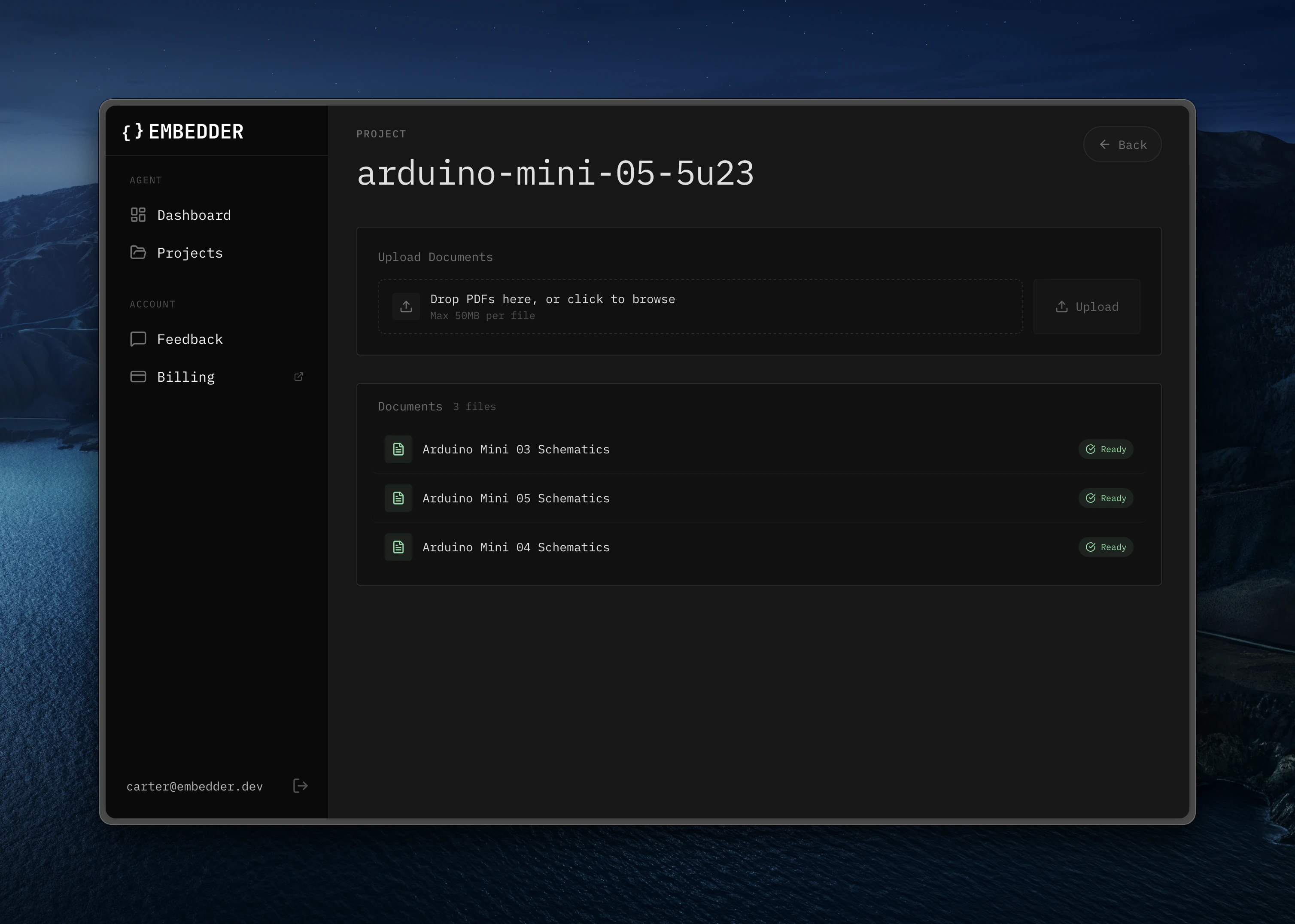 Embedder will use them automatically:
```txt Embedder theme={"system"}
> what's the maximum I2C clock speed for this sensor?
```
```txt Embedder theme={"system"}
> show me the register map for the accelerometer
```
```txt Embedder theme={"system"}
> what are the power consumption specs in sleep mode?
```
### Hardware-aware assistance
Ask hardware-specific questions about your board:
```txt Embedder theme={"system"}
> what switch position on the stm32n6570-dk enables flash mode?
```
```txt Embedder theme={"system"}
> what's the pin mapping for the Arduino header?
```
```txt Embedder theme={"system"}
> can I use DMA with this UART peripheral?
```
## Bash mode
Bypass the AI agent and execute terminal commands directly using the `!` prefix.
```bash theme={"system"}
!ls -la
```
```bash theme={"system"}
!make clean
```
```bash theme={"system"}
!git status
```
This runs the command in your terminal without AI interpretation. Useful for quick commands when you don't need AI assistance.
## Serial send mode
Send messages directly to your MCU over serial using the `~` prefix.
```txt embedder theme={"system"}
~help
```
```txt embedder theme={"system"}
~reset
```
```txt embedder theme={"system"}
~get status
```
This sends the text directly to your device's serial console.
Use for:
* Sending AT commands
* Interacting with device CLI/REPL
* Manual debugging commands
## Reference files and directories
Use `@` to quickly include files or directories in your prompts.
```txt Embedder theme={"system"}
> explain the logic in @src/main.c
```
```txt Embedder theme={"system"}
> what does @drivers/i2c.h do?
```
```txt Embedder theme={"system"}
> what's in @src/drivers/?
```
```txt Embedder theme={"system"}
> show me the structure of @lib/
```
```txt Embedder theme={"system"}
> compare @src/old_driver.c and @src/new_driver.c
```
Hold `Shift` and drag any file from your workspace sidebar into the Embedder prompt to reference it automatically — no need to type the path.
Embedder will use them automatically:
```txt Embedder theme={"system"}
> what's the maximum I2C clock speed for this sensor?
```
```txt Embedder theme={"system"}
> show me the register map for the accelerometer
```
```txt Embedder theme={"system"}
> what are the power consumption specs in sleep mode?
```
### Hardware-aware assistance
Ask hardware-specific questions about your board:
```txt Embedder theme={"system"}
> what switch position on the stm32n6570-dk enables flash mode?
```
```txt Embedder theme={"system"}
> what's the pin mapping for the Arduino header?
```
```txt Embedder theme={"system"}
> can I use DMA with this UART peripheral?
```
## Bash mode
Bypass the AI agent and execute terminal commands directly using the `!` prefix.
```bash theme={"system"}
!ls -la
```
```bash theme={"system"}
!make clean
```
```bash theme={"system"}
!git status
```
This runs the command in your terminal without AI interpretation. Useful for quick commands when you don't need AI assistance.
## Serial send mode
Send messages directly to your MCU over serial using the `~` prefix.
```txt embedder theme={"system"}
~help
```
```txt embedder theme={"system"}
~reset
```
```txt embedder theme={"system"}
~get status
```
This sends the text directly to your device's serial console.
Use for:
* Sending AT commands
* Interacting with device CLI/REPL
* Manual debugging commands
## Reference files and directories
Use `@` to quickly include files or directories in your prompts.
```txt Embedder theme={"system"}
> explain the logic in @src/main.c
```
```txt Embedder theme={"system"}
> what does @drivers/i2c.h do?
```
```txt Embedder theme={"system"}
> what's in @src/drivers/?
```
```txt Embedder theme={"system"}
> show me the structure of @lib/
```
```txt Embedder theme={"system"}
> compare @src/old_driver.c and @src/new_driver.c
```
Hold `Shift` and drag any file from your workspace sidebar into the Embedder prompt to reference it automatically — no need to type the path.
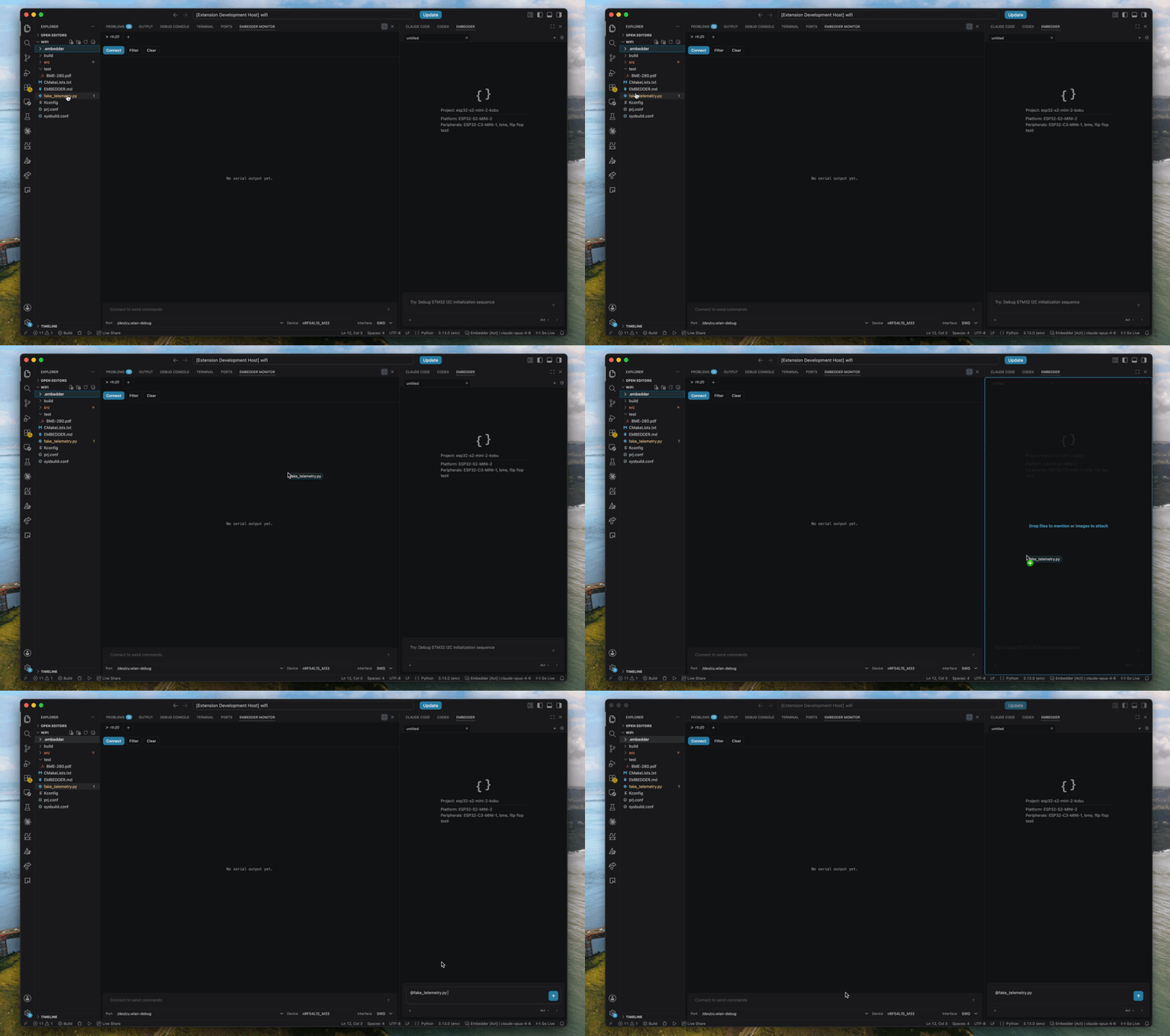 You can also drag files in from Finder the same way — just hold `Shift` while dropping them into the prompt.
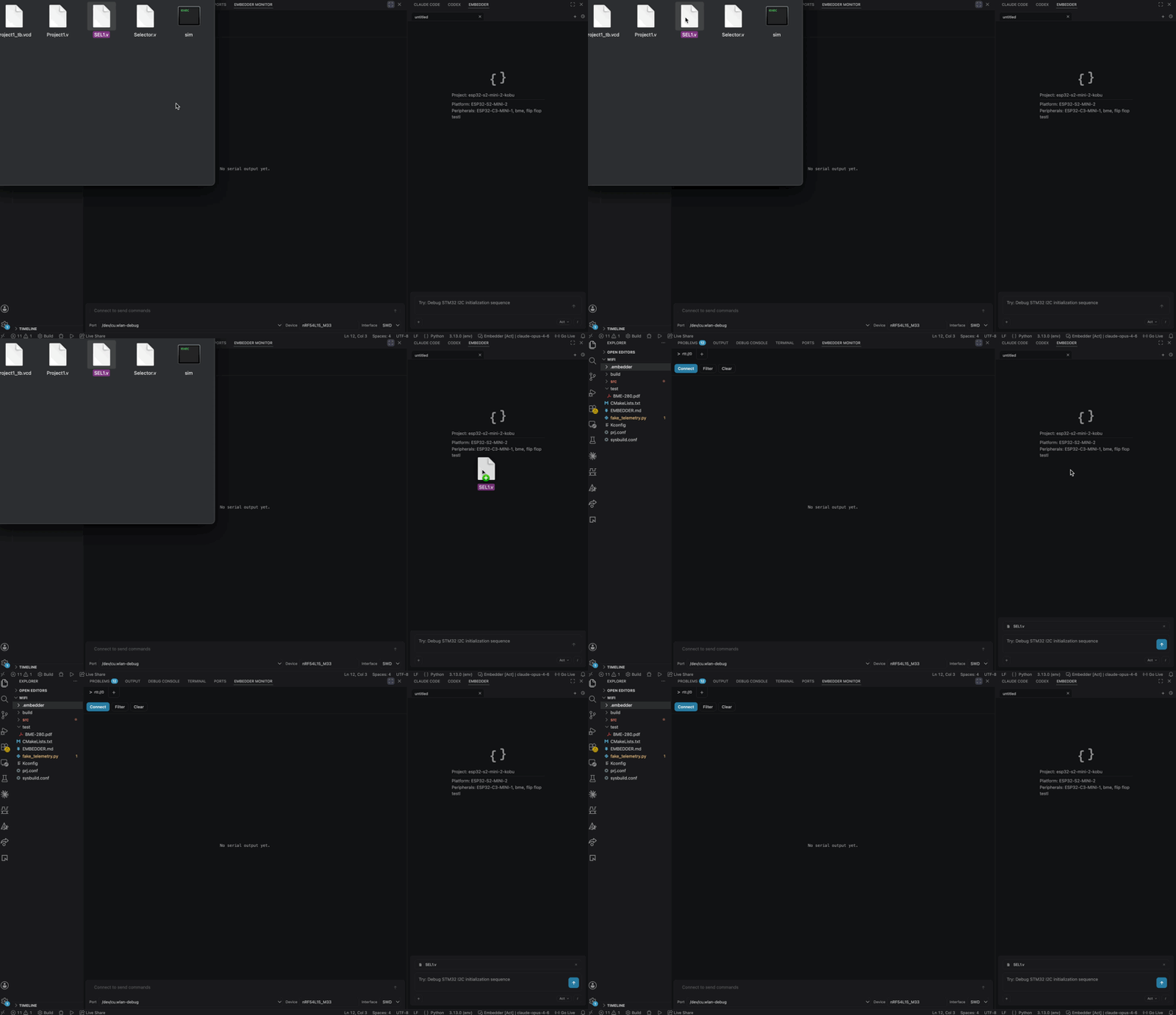 File paths can be relative or absolute. Directory references show file listings, not contents.
## Session management
### Switch projects
```txt Embedder theme={"system"}
/project # Switch to a different project
```
### Resume previous sessions
```txt Embedder theme={"system"}
/history # Browse and resume past conversations
```
### Manage context
For long conversations:
```txt Embedder theme={"system"}
/compress # Compress conversation to save context
```
## Quick reference
| Workflow | Command/Shortcut |
| ------------------- | ------------------------------------ |
| New project setup | `/project` → `/peripheral` → `/init` |
| Serial monitor | `/serial` or `` Ctrl+` `` |
| Switch mode | `Shift+Tab` or `/plan` `/act` |
| Add peripheral | `/peripheral` |
| Reference file | `@filename` in prompt |
| Bash mode | `!command` (e.g., `!ls`) |
| Serial send | `~message` (e.g., `~help`) |
| Undo last message | `/undo` or `Ctrl+Z` |
| Rewind conversation | `/rewind` or `Ctrl+Z (2x)` |
| Resume session | `/history` |
| Compress context | `/compress` |
| Web console | `/console` |
| Get help | `/help` |
File paths can be relative or absolute. Directory references show file listings, not contents.
## Session management
### Switch projects
```txt Embedder theme={"system"}
/project # Switch to a different project
```
### Resume previous sessions
```txt Embedder theme={"system"}
/history # Browse and resume past conversations
```
### Manage context
For long conversations:
```txt Embedder theme={"system"}
/compress # Compress conversation to save context
```
## Quick reference
| Workflow | Command/Shortcut |
| ------------------- | ------------------------------------ |
| New project setup | `/project` → `/peripheral` → `/init` |
| Serial monitor | `/serial` or `` Ctrl+` `` |
| Switch mode | `Shift+Tab` or `/plan` `/act` |
| Add peripheral | `/peripheral` |
| Reference file | `@filename` in prompt |
| Bash mode | `!command` (e.g., `!ls`) |
| Serial send | `~message` (e.g., `~help`) |
| Undo last message | `/undo` or `Ctrl+Z` |
| Rewind conversation | `/rewind` or `Ctrl+Z (2x)` |
| Resume session | `/history` |
| Compress context | `/compress` |
| Web console | `/console` |
| Get help | `/help` |