> ## Documentation Index
> Fetch the complete documentation index at: https://docs.embedder.com/llms.txt
> Use this file to discover all available pages before exploring further.
# Logic analyzer
> Ask Embedder to capture and decode SPI, I²C, UART, CAN, USB, and 20 other digital protocols
In debug mode, Embedder can drive a Saleae or Digilent logic analyzer to capture digital signals, decode them as protocol frames, and surface the results in the **Logic tab** of the Console panel (VS Code extension and standalone app). Describe what you want to see — "capture I²C", "show me the SPI frames" — and the agent handles the rest.
Logic analyzer support is in **beta**. Both vendors are supported through one agnostic API; the prompts you write are the same either way.
## Prerequisites
Run `/debug` or click the Debug button.
Install Saleae Logic 2 and enable the Automation API:
1. Open Logic 2.
2. Click the **Automation** button at the bottom right.
3. In the popup, toggle **Automation Server** to **ON**.
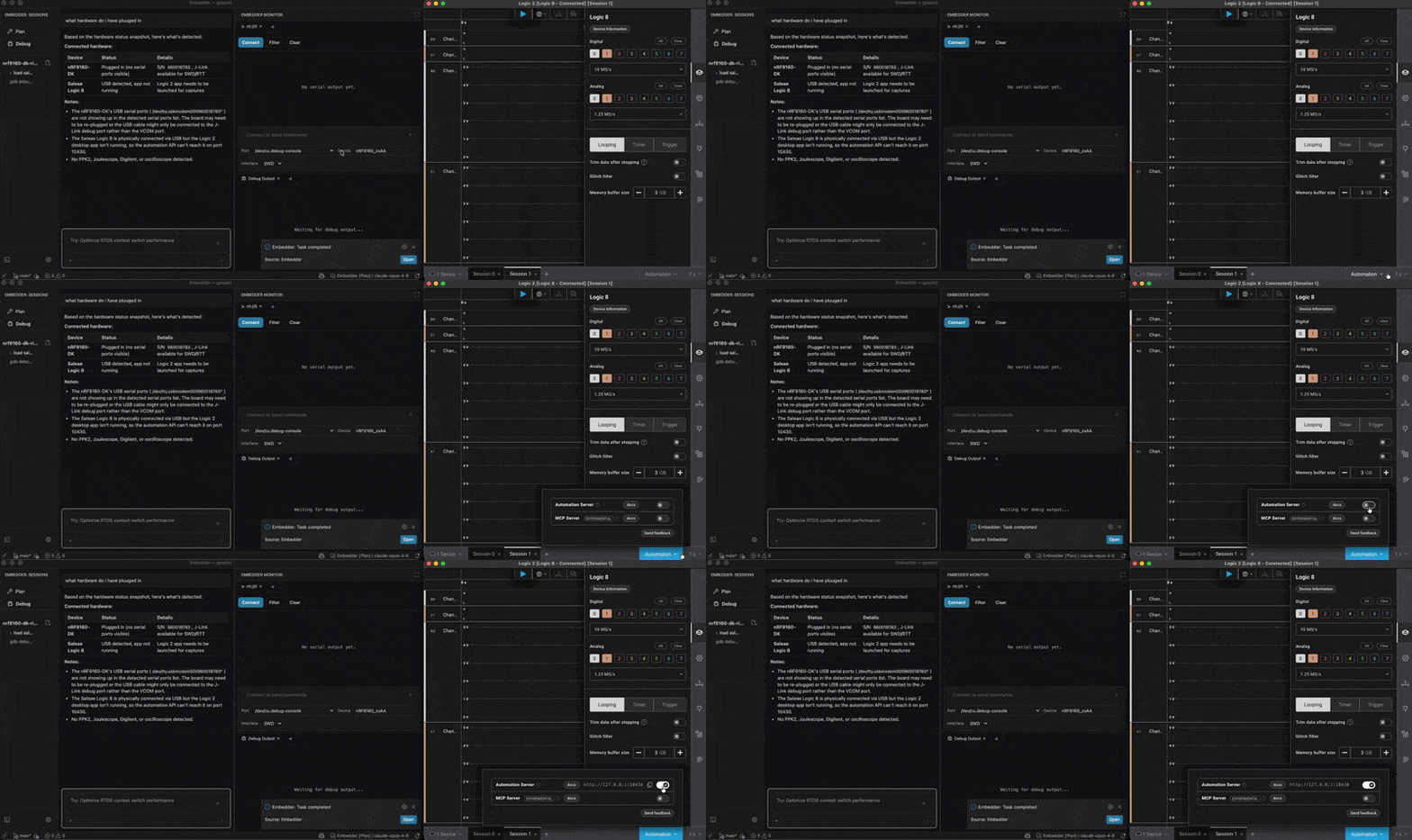 Embedder installs the `logic2-automation` Python package automatically on first use.
Install Digilent WaveForms. Embedder installs `dwfpy` automatically on first use. The same Analog Discovery 3 also serves as an [oscilloscope](/debug-mode/oscilloscope).
Connect digital channels to your DUT signals. Note which channel index goes to which signal — you'll mention them in your prompt.
Match the analyzer's threshold to your DUT's logic level (Saleae supports `0.0`, `1.2`, `1.8`, `3.3` V; AD3 has a fixed threshold). 1.8 V signals at a 3.3 V threshold capture nothing.
* **Saleae:** Logic 2 must be **running** with the Automation API enabled — Embedder talks to the live app over port 10430. Don't quit Logic 2 before prompting.
* **Digilent:** WaveForms must be **closed**. The AD3 only accepts one process at a time; if WaveForms has the device open, Embedder's `dwfpy` will fail to claim it.
## Example prompts
**Capture and decode I²C:**
```txt embedder theme={"system"}
> capture 2 seconds of I²C on SDA=channel 0, SCL=channel 1, decode it, and show me the addresses
```
Embedder installs the `logic2-automation` Python package automatically on first use.
Install Digilent WaveForms. Embedder installs `dwfpy` automatically on first use. The same Analog Discovery 3 also serves as an [oscilloscope](/debug-mode/oscilloscope).
Connect digital channels to your DUT signals. Note which channel index goes to which signal — you'll mention them in your prompt.
Match the analyzer's threshold to your DUT's logic level (Saleae supports `0.0`, `1.2`, `1.8`, `3.3` V; AD3 has a fixed threshold). 1.8 V signals at a 3.3 V threshold capture nothing.
* **Saleae:** Logic 2 must be **running** with the Automation API enabled — Embedder talks to the live app over port 10430. Don't quit Logic 2 before prompting.
* **Digilent:** WaveForms must be **closed**. The AD3 only accepts one process at a time; if WaveForms has the device open, Embedder's `dwfpy` will fail to claim it.
## Example prompts
**Capture and decode I²C:**
```txt embedder theme={"system"}
> capture 2 seconds of I²C on SDA=channel 0, SCL=channel 1, decode it, and show me the addresses
```
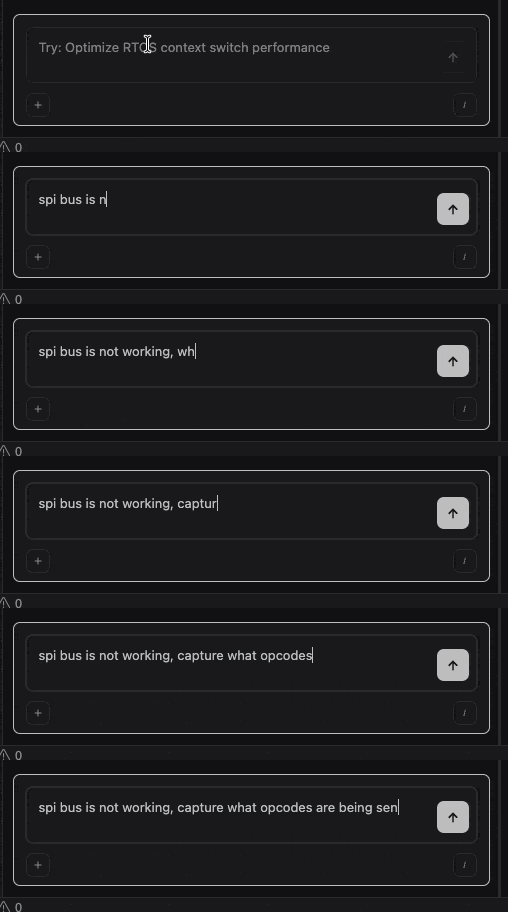 **Capture SPI without setting it up:**
```txt embedder theme={"system"}
> the SPI flash isn't responding — capture the bus and tell me what's happening
```
If the agent doesn't know your wiring, it'll ask. Include channel assignments in your prompt to skip the question.
**UART at a non-standard baud:**
```txt embedder theme={"system"}
> capture UART on channel 0 at 230400 baud for 5 seconds and decode it
```
**Trigger on an event (Digilent only):**
```txt embedder theme={"system"}
> wait for a rising edge on channel 4, then capture I²C for 1 second
```
Saleae captures are timed only — for cross-tool triggers, see [Combined workflows](/debug-mode/combined-workflows).
**Catch an intermittent bug:**
```txt embedder theme={"system"}
> start a manual capture of CAN, I'll let it run while I reproduce the fault
```
The agent starts an open-ended capture and waits. When you say "stop the capture and decode it", it finalizes and exports.
**Decode a less-common protocol:**
```txt embedder theme={"system"}
> decode the LIN bus on channel 0 at 19200 baud, version 2.x
```
## Supported protocols
Saleae offers 23 native decoders; Digilent supports a subset of 11. Most common protocols work on both:
| Protocol | Saleae | Digilent | Common options to mention |
| ------------------------------------------------------------------------------------------------- | ------ | -------- | ----------------------------------------- |
| UART | ✓ | ✓ | bit rate, parity, stop bits |
| SPI | ✓ | ✓ | bits per transfer |
| I²C | ✓ | ✓ | 7-bit / 10-bit address mode |
| CAN | ✓ | ✓ | bit rate (default 500 kbit/s on Digilent) |
| LIN | ✓ | ✓ | bit rate, LIN version |
| 1-Wire | ✓ | ✓ | — |
| I²S / PCM | ✓ | ✓ | — |
| Manchester | ✓ | ✓ | bit rate, edge polarity |
| JTAG | ✓ | ✓ | — |
| Modbus | ✓ | ✓ | — |
| SWD | ✓ | — | — |
| USB | ✓ | — | — |
| HD44780, MIDI, MDIO, SMBus, BiSS-C, DMX512, HDLC, HDMI-CEC, PS/2, Synchronous Parallel, Atmel SWI | ✓ | — | — |
If your protocol's options aren't standard, mention them in the prompt: "decode UART at 9600 baud, 7 bits, even parity, 2 stop bits".
## What the agent does for you
The agent writes a Python script that captures the requested channels, attaches a protocol decoder, and exports CSVs (decoded frames in hex) plus a native capture file. Captures auto-publish to the **Logic tab** of the Console panel (VS Code extension and standalone app) with waveform + decoded frames side by side, and persist under `.embedder/captures///` so you can come back to them later. TUI users get the same persisted files but no interactive chart.
## Common gotchas
Check the threshold. Capturing 1.8 V signals at a 3.3 V threshold (default) gives a flat zero. On Saleae, set it explicitly: "use a 1.8V threshold". On AD3, use a level shifter.
Wrong baud / clock / bits. UART defaults to 115200 8N1; SPI defaults to 8 bits per transfer. Mention the actual settings in your prompt.
The capture helper auto-snaps unsupported rates to the nearest valid rate and warns. If you need more bandwidth, ask: "use the maximum supported sample rate for this device".
For Saleae, Logic 2 must be running with the Automation Server toggled on (Automation button in the bottom right). For Digilent, the WaveForms desktop app must be closed — the AD3 only accepts one process at a time.
## Next steps
Probe analog signal integrity when digital decode looks fine.
Trigger a logic capture from a GDB breakpoint or GPIO edge.
**Capture SPI without setting it up:**
```txt embedder theme={"system"}
> the SPI flash isn't responding — capture the bus and tell me what's happening
```
If the agent doesn't know your wiring, it'll ask. Include channel assignments in your prompt to skip the question.
**UART at a non-standard baud:**
```txt embedder theme={"system"}
> capture UART on channel 0 at 230400 baud for 5 seconds and decode it
```
**Trigger on an event (Digilent only):**
```txt embedder theme={"system"}
> wait for a rising edge on channel 4, then capture I²C for 1 second
```
Saleae captures are timed only — for cross-tool triggers, see [Combined workflows](/debug-mode/combined-workflows).
**Catch an intermittent bug:**
```txt embedder theme={"system"}
> start a manual capture of CAN, I'll let it run while I reproduce the fault
```
The agent starts an open-ended capture and waits. When you say "stop the capture and decode it", it finalizes and exports.
**Decode a less-common protocol:**
```txt embedder theme={"system"}
> decode the LIN bus on channel 0 at 19200 baud, version 2.x
```
## Supported protocols
Saleae offers 23 native decoders; Digilent supports a subset of 11. Most common protocols work on both:
| Protocol | Saleae | Digilent | Common options to mention |
| ------------------------------------------------------------------------------------------------- | ------ | -------- | ----------------------------------------- |
| UART | ✓ | ✓ | bit rate, parity, stop bits |
| SPI | ✓ | ✓ | bits per transfer |
| I²C | ✓ | ✓ | 7-bit / 10-bit address mode |
| CAN | ✓ | ✓ | bit rate (default 500 kbit/s on Digilent) |
| LIN | ✓ | ✓ | bit rate, LIN version |
| 1-Wire | ✓ | ✓ | — |
| I²S / PCM | ✓ | ✓ | — |
| Manchester | ✓ | ✓ | bit rate, edge polarity |
| JTAG | ✓ | ✓ | — |
| Modbus | ✓ | ✓ | — |
| SWD | ✓ | — | — |
| USB | ✓ | — | — |
| HD44780, MIDI, MDIO, SMBus, BiSS-C, DMX512, HDLC, HDMI-CEC, PS/2, Synchronous Parallel, Atmel SWI | ✓ | — | — |
If your protocol's options aren't standard, mention them in the prompt: "decode UART at 9600 baud, 7 bits, even parity, 2 stop bits".
## What the agent does for you
The agent writes a Python script that captures the requested channels, attaches a protocol decoder, and exports CSVs (decoded frames in hex) plus a native capture file. Captures auto-publish to the **Logic tab** of the Console panel (VS Code extension and standalone app) with waveform + decoded frames side by side, and persist under `.embedder/captures///` so you can come back to them later. TUI users get the same persisted files but no interactive chart.
## Common gotchas
Check the threshold. Capturing 1.8 V signals at a 3.3 V threshold (default) gives a flat zero. On Saleae, set it explicitly: "use a 1.8V threshold". On AD3, use a level shifter.
Wrong baud / clock / bits. UART defaults to 115200 8N1; SPI defaults to 8 bits per transfer. Mention the actual settings in your prompt.
The capture helper auto-snaps unsupported rates to the nearest valid rate and warns. If you need more bandwidth, ask: "use the maximum supported sample rate for this device".
For Saleae, Logic 2 must be running with the Automation Server toggled on (Automation button in the bottom right). For Digilent, the WaveForms desktop app must be closed — the AD3 only accepts one process at a time.
## Next steps
Probe analog signal integrity when digital decode looks fine.
Trigger a logic capture from a GDB breakpoint or GPIO edge.