> ## Documentation Index
> Fetch the complete documentation index at: https://docs.embedder.com/llms.txt
> Use this file to discover all available pages before exploring further.
# Oscilloscope
> Ask Embedder to capture analog signals — clock, reset, rails, comm lines — over LAN/SCPI on a Siglent SDS800X HD
In debug mode, Embedder can drive a Siglent SDS800X HD bench scope over LAN to capture analog waveforms. Supported models: SDS802X HD, SDS804X HD, SDS812X HD, SDS814X HD, SDS822X HD, SDS824X HD. Captures auto-publish to the **Power tab** of the Console panel (VS Code extension and standalone app).
Oscilloscope support is in **beta**. The SDS800X HD family is fully supported. Other LXI / SCPI scopes may work for some features but aren't fully verified — expect rough edges.
## What you can probe
| Signal | What you're checking |
| ---------------------- | ------------------------------------------------- |
| Crystal / clock output | Oscillator startup, frequency, ringing |
| `nRESET` | Reset pulse width, edge integrity |
| VDD / 3V3 rail | Droop under load, ripple |
| UART TX/RX | Idle level, edge slew, glitches |
| SPI `SCK` / `CS` | Clock integrity at high rates |
| I²C `SDA` / `SCL` | Pull-up strength, rise time |
| PWM | Duty cycle, frequency, glitches |
| GPIO debug pin | Interrupt latency (firmware toggles a pin in ISR) |
## Prerequisites
Run `/debug`.
Embedder installs `pyvisa` and `pyvisa-py` automatically the first time you run a scope script — approve the install when prompted.
Connect the scope to the same LAN as your host (Ethernet or Wi-Fi). Embedder browses mDNS (`_lxi._tcp` / `_vxi-11._tcp` / `_scpi-raw._tcp`) on every non-internal IPv4 NIC, so any LXI-compliant scope shows up in `hardware_status` under `metadata.discoveredScopes` with its `vendor`, `model`, `serial`, `firmware`, `ip`, and `hostname`.
If `discoveredScopes` is empty (corporate Wi-Fi, AP isolation, mDNS blocked), set the IP directly:
```bash theme={"system"}
export EMBEDDER_SCOPE_HOST=192.168.1.20
```
Read the scope's IP from the front panel under **Utility → Menu → I/O → LAN Config** (DHCP is on by default). Quick reachability check: open `http://` in a browser and you should see the scope's built-in LXI status page.
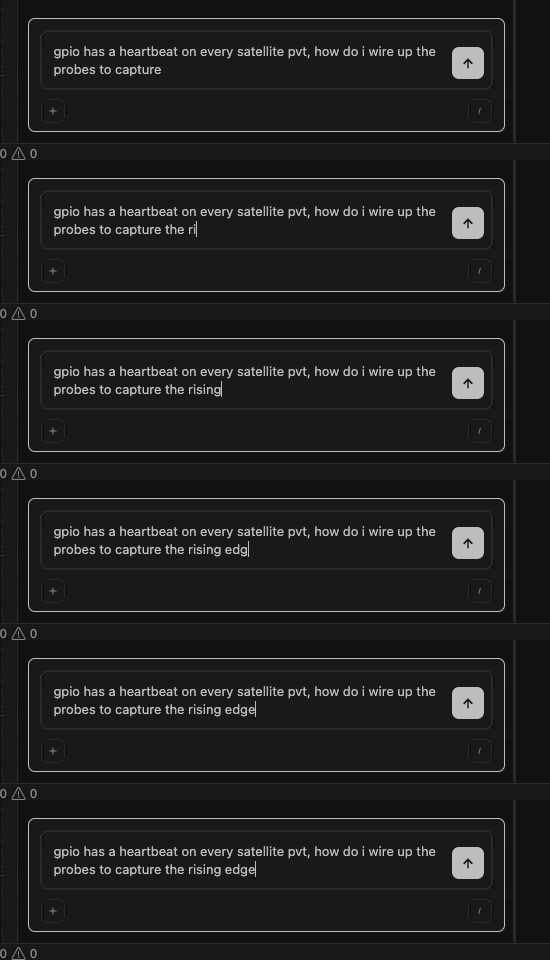
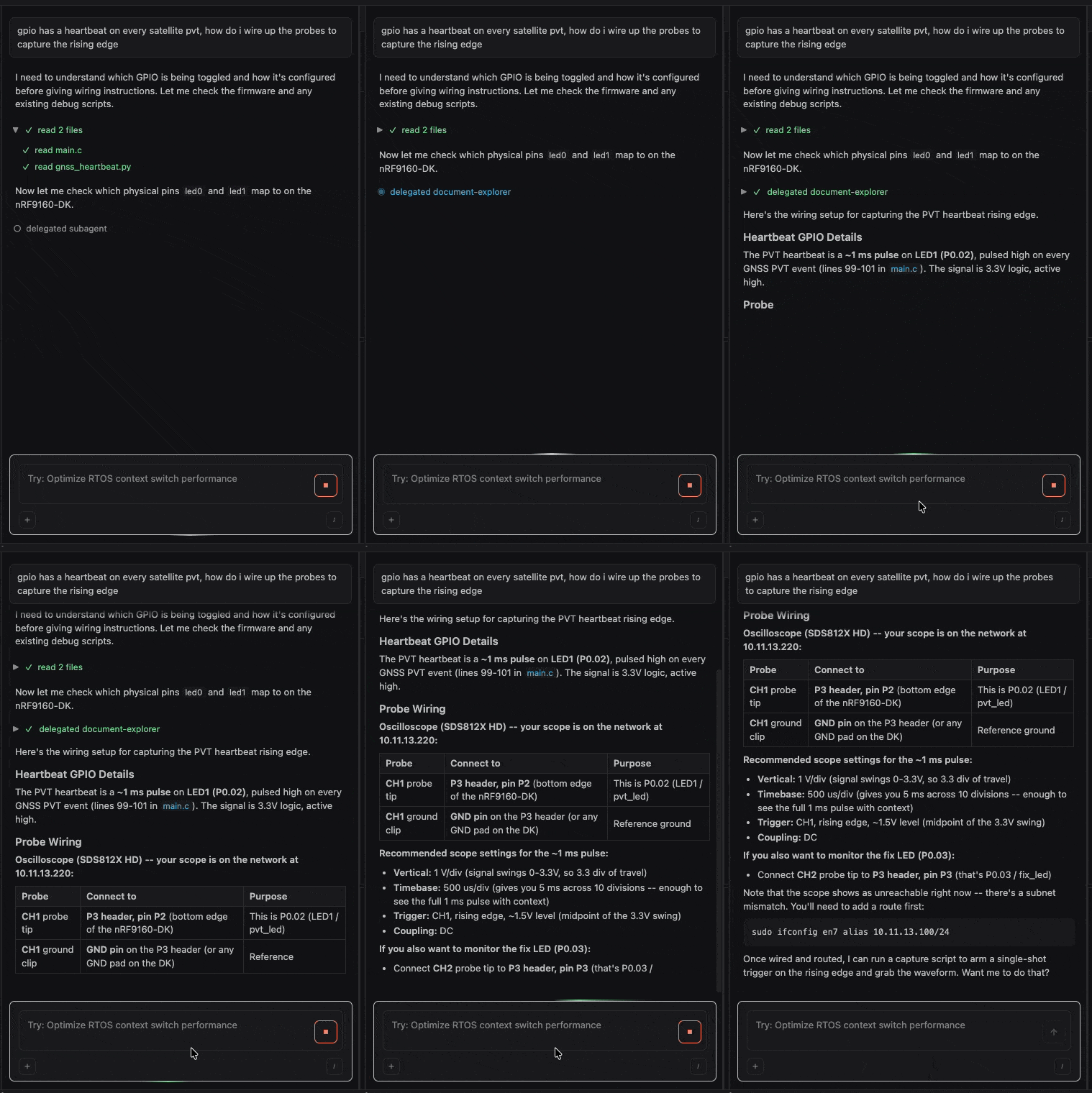
Not sure which probe goes where? Ask Embedder:
 ## Example prompts
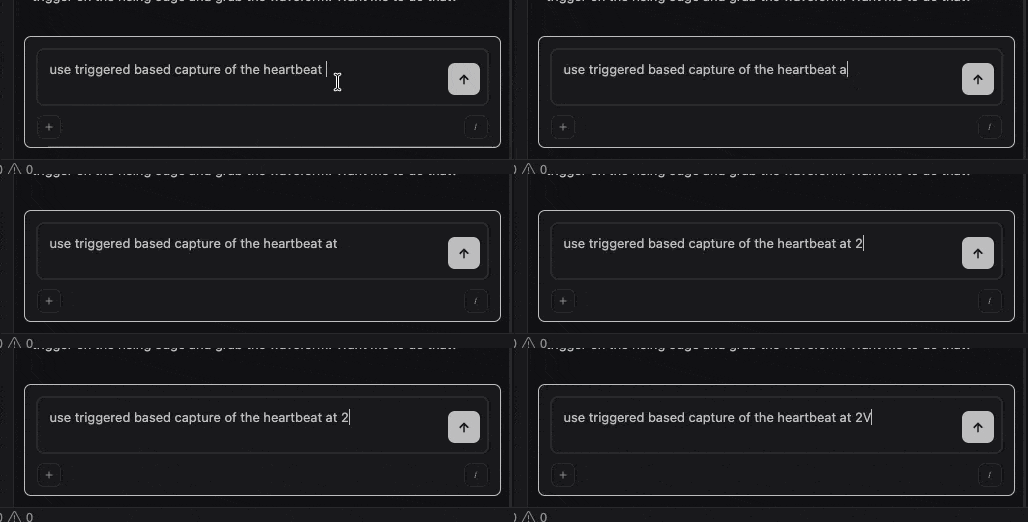
**Single-shot capture on an edge trigger:**
```txt embedder theme={"system"}
> connect to the SDS812X HD on the LAN, set channel 1 to 500mV/div DC, timebase 1ms/div, trigger on rising C1 at 1.5V, single-shot capture, and tell me the rise time
```
The agent arms a single-shot trigger, blocks until it fires, and reads the frozen acquisition. Rise time comes back via the scope's built-in measurement.
## Example prompts
**Single-shot capture on an edge trigger:**
```txt embedder theme={"system"}
> connect to the SDS812X HD on the LAN, set channel 1 to 500mV/div DC, timebase 1ms/div, trigger on rising C1 at 1.5V, single-shot capture, and tell me the rise time
```
The agent arms a single-shot trigger, blocks until it fires, and reads the frozen acquisition. Rise time comes back via the scope's built-in measurement.
 **Screenshot the scope display:**
```txt embedder theme={"system"}
> grab a BMP screenshot of the current scope display and save it under /tmp/scope.bmp
```
**Check rail integrity under load:**
```txt embedder theme={"system"}
> probe VDD while I enable the radio peripheral. is the rail clean?
```
The agent records a high-rate analog trace, looks for droop or ringing, and reports min / max / avg.
**Measure interrupt latency:**
```txt embedder theme={"system"}
> i toggle a GPIO at the start of EXTI0_IRQHandler. trigger on the rising edge of channel 1, capture both the trigger line and the GPIO, and tell me the latency.
```
You'll need a debug GPIO toggle in your ISR; the agent computes the time delta from the captured trace.
**Verify SPI clock at high rate:**
```txt embedder theme={"system"}
> capture SPI SCK on the SDS812X with the maximum memory depth — is the edge clean? are there reflections?
```
Use this when the [logic analyzer](/debug-mode/logic-analyzer) is decoding garbage — signal-integrity failures look fine in the digital decode but show up clearly on the scope. The 12-bit ADC and longer memory depth surface ringing and overshoot that lower-resolution captures miss.
**Drop to raw SCPI:**
```txt embedder theme={"system"}
> on the SDS812X, set memory depth to 100K with `:ACQ:MDEP 100K`, then run rise/fall measurements on channel 1
```
Reach for raw SCPI when the helper layer doesn't cover what you need — the Siglent SDS Series Programming Guide (EN11G) is the full API reference.
## What the agent does for you
The agent writes a Python script that opens a SCPI session over LAN, configures channels and timebase, arms the trigger, captures the waveform, and publishes the result to the Power tab. The chart is shared with power-analyzer traces, so you can correlate analog scope captures with current measurements on the same timeline.
## Common gotchas
Check that the scope is on the same LAN as your host and that you can open `http://` in a browser. If mDNS is blocked (corporate Wi-Fi, AP isolation), set `EMBEDDER_SCOPE_HOST=` and re-run `hardware_status`. If `discoveredScopes` shows the scope but `reachable: false`, follow the `suggestedFix` (typically a subnet alias like `sudo ifconfig alias /`).
A single-shot capture times out after 5 s by default. Check the trigger source, level, and coupling, or ask the agent to use a longer timeout: "wait up to 30 seconds for the trigger".
V/div is too coarse for the signal — the trace runs into the rails. Ask the agent to "drop V/div to 200 mV" or whatever fits. The opposite (V/div too fine) shows a flat-looking line because the signal is way bigger than the visible window.
Some helpers are tuned for the SDS800X HD's specifics. On other LXI / SCPI scopes those helpers may misparse data or fail — fall back to raw `scope_query` / `scope_write` calls and the vendor's programming guide, or stick to a verified SDS800X HD model for full coverage.
## Next steps
Decode digital protocols with a Saleae or Digilent.
Mix scope, logic, and GDB in one debug session.
**Screenshot the scope display:**
```txt embedder theme={"system"}
> grab a BMP screenshot of the current scope display and save it under /tmp/scope.bmp
```
**Check rail integrity under load:**
```txt embedder theme={"system"}
> probe VDD while I enable the radio peripheral. is the rail clean?
```
The agent records a high-rate analog trace, looks for droop or ringing, and reports min / max / avg.
**Measure interrupt latency:**
```txt embedder theme={"system"}
> i toggle a GPIO at the start of EXTI0_IRQHandler. trigger on the rising edge of channel 1, capture both the trigger line and the GPIO, and tell me the latency.
```
You'll need a debug GPIO toggle in your ISR; the agent computes the time delta from the captured trace.
**Verify SPI clock at high rate:**
```txt embedder theme={"system"}
> capture SPI SCK on the SDS812X with the maximum memory depth — is the edge clean? are there reflections?
```
Use this when the [logic analyzer](/debug-mode/logic-analyzer) is decoding garbage — signal-integrity failures look fine in the digital decode but show up clearly on the scope. The 12-bit ADC and longer memory depth surface ringing and overshoot that lower-resolution captures miss.
**Drop to raw SCPI:**
```txt embedder theme={"system"}
> on the SDS812X, set memory depth to 100K with `:ACQ:MDEP 100K`, then run rise/fall measurements on channel 1
```
Reach for raw SCPI when the helper layer doesn't cover what you need — the Siglent SDS Series Programming Guide (EN11G) is the full API reference.
## What the agent does for you
The agent writes a Python script that opens a SCPI session over LAN, configures channels and timebase, arms the trigger, captures the waveform, and publishes the result to the Power tab. The chart is shared with power-analyzer traces, so you can correlate analog scope captures with current measurements on the same timeline.
## Common gotchas
Check that the scope is on the same LAN as your host and that you can open `http://` in a browser. If mDNS is blocked (corporate Wi-Fi, AP isolation), set `EMBEDDER_SCOPE_HOST=` and re-run `hardware_status`. If `discoveredScopes` shows the scope but `reachable: false`, follow the `suggestedFix` (typically a subnet alias like `sudo ifconfig alias /`).
A single-shot capture times out after 5 s by default. Check the trigger source, level, and coupling, or ask the agent to use a longer timeout: "wait up to 30 seconds for the trigger".
V/div is too coarse for the signal — the trace runs into the rails. Ask the agent to "drop V/div to 200 mV" or whatever fits. The opposite (V/div too fine) shows a flat-looking line because the signal is way bigger than the visible window.
Some helpers are tuned for the SDS800X HD's specifics. On other LXI / SCPI scopes those helpers may misparse data or fail — fall back to raw `scope_query` / `scope_write` calls and the vendor's programming guide, or stick to a verified SDS800X HD model for full coverage.
## Next steps
Decode digital protocols with a Saleae or Digilent.
Mix scope, logic, and GDB in one debug session.