> ## Documentation Index
> Fetch the complete documentation index at: https://docs.embedder.com/llms.txt
> Use this file to discover all available pages before exploring further.
# Run the daemon
> Start, monitor, and manage the background daemon that executes GitHub and Slack work on your machine
The daemon is a long-lived `embedder` process that connects out to the Embedder backend, claims queued [GitHub](/headless/github) and [Slack](/headless/slack) work items, and executes them on your machine. It is **organization-wide**: one daemon serves all of your organization's mapped repositories, regardless of which directory you start it from.
Run it on your development machine, or on an always-on box with your target hardware attached — headless work can build, flash, and verify over serial just like an interactive session.
## Before you begin
Make sure you have:
* Embedder installed. If you have not installed it yet, start with [Quickstart](/quickstart).
* An Embedder account that is a **member of the teams** whose repositories the daemon should serve — the daemon can only claim work for teams you belong to.
* A machine that can stay online while the daemon is running.
For the smoothest setup, sign in with the normal `embedder` command first. `embedder start daemon` can then create and store a daemon API key from your login automatically.
## Start the daemon
From any directory, run:
```bash theme={"system"}
embedder start daemon
```
The command starts a detached daemon in the background — you can close the terminal afterwards.
```text theme={"system"}
Started Embedder daemon in the background.
PID: 21004
Scope: all linked repositories
Run `embedder monitor` to inspect it.
```
If a daemon is already running, Embedder prints the active PID instead of starting a duplicate.
### Credentials
`embedder start daemon` resolves an API key in this order:
1. **`EMBEDDER_API_KEY`**, if set in the environment.
2. **A stored daemon API key** from a previous start.
3. **A key created from your current login** — if you are signed in, one is created and stored automatically.
4. **A prompt to paste a key** if none of the above are available.
For non-interactive machines, create a token in [the dashboard](https://app.embedder.com/account) under **Account** → **Tokens** (tokens are shown once — copy them when created), then start the daemon with the key set:
```bash theme={"system"}
export EMBEDDER_API_KEY=your_key_here
embedder start daemon
```
```powershell theme={"system"}
$env:EMBEDDER_API_KEY="your_key_here"
embedder start daemon
```
Store API keys safely. Anyone with the key can run daemon work as your account.
### Pin the daemon to one team and project
By default the daemon claims work for **all** mapped repositories in teams you belong to. To restrict it, pass both `--team` and `--project`:
```bash theme={"system"}
embedder start daemon --team "Firmware Team" --project "sensor-hub"
```
You can also use environment variables:
```bash theme={"system"}
EMBEDDER_TEAM="Firmware Team" EMBEDDER_PROJECT="sensor-hub" embedder start daemon
```
Names are matched case-insensitively and must be exact.
`--team` and `--project` must be provided together. Passing only one of them exits with a usage error.
## Monitor the daemon
```bash theme={"system"}
embedder monitor
```
The monitor is a live dashboard that refreshes every second. It shows the daemon's connection state, current activity, GitHub and Slack work phases, claimed team and project, connected hardware (serial ports, J-Link probes), and a `[ Stop ]` control. Press m to change the model the daemon uses.
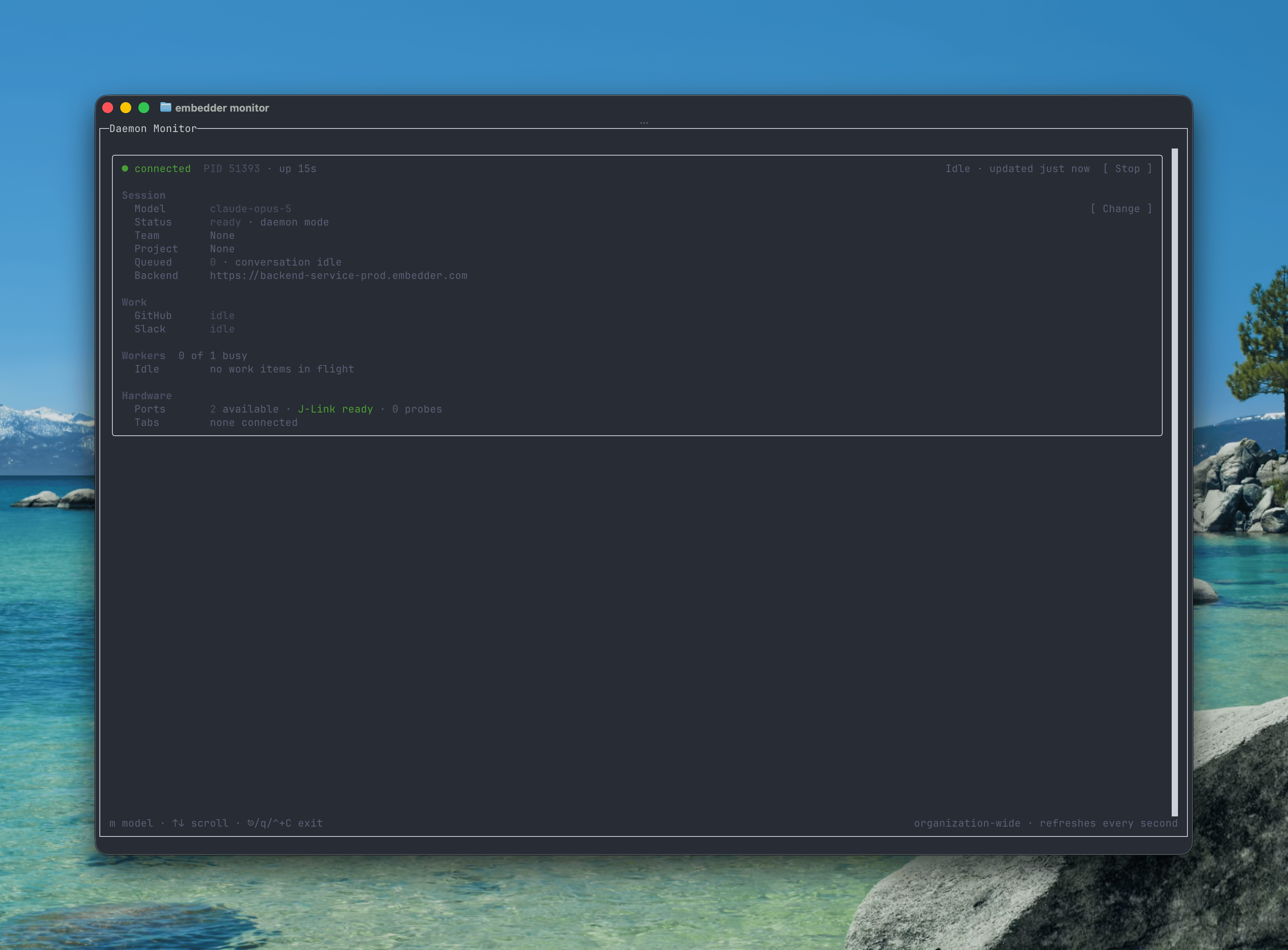 Typical phases you'll see: `Polling GitHub work queue`, `Executing GitHub work for `, `Executing Slack work for `, `Waiting for GitHub reply on `, and `Idle`.
## Stop the daemon
Select `[ Stop ]` in the monitor, or run:
```bash theme={"system"}
embedder stop daemon
```
If more than one daemon is active, pass the PID shown by `embedder monitor`:
```bash theme={"system"}
embedder stop daemon --pid 21004
```
## How the daemon executes work
Understanding the execution model helps when you're deciding where to run the daemon:
* **One work item at a time.** The daemon claims a single GitHub or Slack item, finishes it (or pauses it on a follow-up question), then claims the next. The monitor shows `Waiting for local capacity` when items queue behind a running one.
* **Isolated worktrees.** Each work item runs in a fresh git worktree under `~/.embedder`, on a branch named `embedder/work/`. Your local checkouts are never touched, and no pre-existing clone is needed — the repository is fetched using a short-lived token from the backend. Embedder ships its own `git`, and the `gh` CLI is not required.
* **Auto-approved tools.** There is no human in the loop, so tool confirmations are auto-approved and the agent cannot ask interactive questions mid-run — it instead pauses the work item and asks in the originating GitHub or Slack thread.
* **The backend does the talking.** The daemon commits (as `Embedder Agent `) and pushes the branch; the backend opens or updates the pull request and posts every comment and Slack reply. The daemon machine never holds GitHub credentials.
* **Runs are capped at 30 minutes.** A run that exceeds the ceiling is aborted and reported as failed.
* **Follow-up questions free the daemon.** When the agent asks a question, the work item's state — conversation, worktree, todo list — is saved locally. The daemon takes other work, and when the requester replies, the item resumes from the saved state.
* **Failed runs keep their worktree** for seven days so you can inspect what happened; cleanup is automatic after that.
## Troubleshooting
The backend rejected the daemon's API key — it was revoked, expired, or belongs to a different backend. Run `embedder start daemon` again to set up a fresh key, or create one in [the dashboard](https://app.embedder.com/account) under **Account** → **Tokens** and export `EMBEDDER_API_KEY`.
`--team`/`--project` names must match exactly (case-insensitive). The error lists the available names — copy the right one, and quote names containing spaces. If a name is ambiguous, use a more specific one.
* The daemon's account must be a **member of the team** the repository is mapped to.
* If the daemon is pinned with `--team`/`--project`, it only claims work for that project — restart without the pin to serve everything.
* Check the repository is actually mapped to a project in [the GitHub integration](/headless/github).
Claimed work whose daemon goes quiet is requeued by the backend after 30 minutes and picked up by the next available daemon. Keep the daemon on a machine that doesn't sleep for uninterrupted service.
The monitor only sees daemons on the same machine. Start one with `embedder start daemon`, or check the machine you started it on.
`embedder monitor` lists each daemon with its PID. Stop a specific one with `embedder stop daemon --pid `.
## Next steps
Map repositories to projects and trigger work with @embedder.
Start headless work from a Slack thread.
Typical phases you'll see: `Polling GitHub work queue`, `Executing GitHub work for `, `Executing Slack work for `, `Waiting for GitHub reply on `, and `Idle`.
## Stop the daemon
Select `[ Stop ]` in the monitor, or run:
```bash theme={"system"}
embedder stop daemon
```
If more than one daemon is active, pass the PID shown by `embedder monitor`:
```bash theme={"system"}
embedder stop daemon --pid 21004
```
## How the daemon executes work
Understanding the execution model helps when you're deciding where to run the daemon:
* **One work item at a time.** The daemon claims a single GitHub or Slack item, finishes it (or pauses it on a follow-up question), then claims the next. The monitor shows `Waiting for local capacity` when items queue behind a running one.
* **Isolated worktrees.** Each work item runs in a fresh git worktree under `~/.embedder`, on a branch named `embedder/work/`. Your local checkouts are never touched, and no pre-existing clone is needed — the repository is fetched using a short-lived token from the backend. Embedder ships its own `git`, and the `gh` CLI is not required.
* **Auto-approved tools.** There is no human in the loop, so tool confirmations are auto-approved and the agent cannot ask interactive questions mid-run — it instead pauses the work item and asks in the originating GitHub or Slack thread.
* **The backend does the talking.** The daemon commits (as `Embedder Agent `) and pushes the branch; the backend opens or updates the pull request and posts every comment and Slack reply. The daemon machine never holds GitHub credentials.
* **Runs are capped at 30 minutes.** A run that exceeds the ceiling is aborted and reported as failed.
* **Follow-up questions free the daemon.** When the agent asks a question, the work item's state — conversation, worktree, todo list — is saved locally. The daemon takes other work, and when the requester replies, the item resumes from the saved state.
* **Failed runs keep their worktree** for seven days so you can inspect what happened; cleanup is automatic after that.
## Troubleshooting
The backend rejected the daemon's API key — it was revoked, expired, or belongs to a different backend. Run `embedder start daemon` again to set up a fresh key, or create one in [the dashboard](https://app.embedder.com/account) under **Account** → **Tokens** and export `EMBEDDER_API_KEY`.
`--team`/`--project` names must match exactly (case-insensitive). The error lists the available names — copy the right one, and quote names containing spaces. If a name is ambiguous, use a more specific one.
* The daemon's account must be a **member of the team** the repository is mapped to.
* If the daemon is pinned with `--team`/`--project`, it only claims work for that project — restart without the pin to serve everything.
* Check the repository is actually mapped to a project in [the GitHub integration](/headless/github).
Claimed work whose daemon goes quiet is requeued by the backend after 30 minutes and picked up by the next available daemon. Keep the daemon on a machine that doesn't sleep for uninterrupted service.
The monitor only sees daemons on the same machine. Start one with `embedder start daemon`, or check the machine you started it on.
`embedder monitor` lists each daemon with its PID. Stop a specific one with `embedder stop daemon --pid `.
## Next steps
Map repositories to projects and trigger work with @embedder.
Start headless work from a Slack thread.