
Highlights
This week’s updates focus on smoother, more predictable developer workflows and richer file support. You can expect more reliable chat behavior, clearer plan approval controls, faster interaction modes, and improved schematic handling across the CLI and VS Code.New features
Plan execution and approval controls
You can now choose how approved plans execute with a Manually or Automatically execution toggle in both the VS Code extension and the CLI TUI, giving you clear control over when actions run. An always-visible approval-mode pill in the composer footer lets you quickly switch between requiring per-action confirmations and auto-approving safety confirmations.Schematics and EDIF support
Altium and EDIF uploads now surface synthesized KiCad schematics so the viewer shows accurate, geometry-preserving schematics across the CLI and VS Code. Altium files render more consistently, including compatibility with synthesized.kicad_sch companions.Background shell sessions and task logs
Shell tasks can run in the background with output written to per-task log files so you can keep working while long-running commands complete. Task management and log access make it easier to track progress and inspect full outputs without blocking your main session.Miscellaneous
Enhancements
Enhancements
- Fast mode and new model provider
- MCP servers panel in the VS Code side-bar
Bug Fixes
Bug Fixes
- Conversation experience and modal routing
Highlights
This week focused on smoother, more predictable workflows across the CLI and VS Code. Chat navigation and conversation continuity are clearer, TUI and editor rendering are more reliable, and capture workflows gain support for an additional logic analyzer.New features
Chat navigation and conversation continuity
You can recall previous prompts in the webview chat with the up/down arrows and confirm before starting a new conversation, so switching contexts is faster and intentional. Running turns are preserved when you navigate or open history, and a per-conversation activity indicator shows when an agent is working, giving clearer feedback while a turn is streaming.Saleae Original Logic analyzer support
You can now use the budget 24 MHz / 8-channel Saleae-compatible logic analyzer in capture workflows. The device is recognized correctly and captures with appropriate device spec and parameter handling so it behaves like other supported logic analyzers.Miscellaneous
Enhancements
Enhancements
- Chat, history, and UI layout polish
- Terminal and editor client experience
- Improved plan view layout to use more horizontal space
- Improved startup caching to avoid redundant network fetches
Bug Fixes
Bug Fixes
- CLI and TUI stability and rendering
- Fixed static workspace switcher when there is one team
Highlights
This week focused on smoother, more reliable developer and ingestion workflows across the CLI, VS Code extension, and device toolchain. Work improved streaming and session stability, sped up and hardened document ingestion, and made AURIX build and tool discovery more robust for embedded developers.Miscellaneous
Enhancements
Enhancements
- AURIX build generator improvements
- Faster, more reliable PDF ingestion and embedding
- Improved AURIX TC4D7 pinout with USB serial console details
- Improved auto-selection of the newest installed AURIX Studio
Bug Fixes
Bug Fixes
- CLI and VS Code stability and streaming improvements
- Startup caching improvements
Highlights
This week focused on improving the end-to-end experience: faster, more reliable document ingestion for large uploads and smoother chat and editor interactions across the CLI and VS Code. Several reliability fixes also reduce cold-start and runtime interruptions so sessions stay responsive.New features
Faster, more reliable document ingestion
PDF uploads now process more quickly and robustly. Large documents are parsed faster, and scanned pages are recognized reliably, reducing latency and preventing silent page drops during parsing.Miscellaneous
Enhancements
Enhancements
- Smoother chat and editor experience
- Device login codes now remain valid for 30 minutes
- Improved upload-schematics command visibility and VS Code launch
Bug Fixes
Bug Fixes
- Improved CLI and VS Code reliability at startup and runtime
- Fixed loading indicator on the API keys page
- Fixed GitHub reconnect banner when access is revoked
Highlights
This week focused on making the IDE and web experiences feel faster and more reliable while improving hardware workflows. You will notice snappier chat navigation, clearer sign-in messaging, and smoother device and debug interactions.New features
Chat and workspace navigation
You can switch conversations and tabs instantly with immediate paint and per-tab scroll restore, so large histories no longer interrupt your flow. The history sidebar now hosts open-folder and sign-in flows, conversation-specific schematics open in the correct chat, and permission prompts no longer block other active chats.Redesigned subagent tooling
Subagent tooling has a redesigned UI that surfaces live status and grouping more clearly, making delegated tasks easier to follow.Miscellaneous
Enhancements
Enhancements
- Hardware debugging and device workflows
- Sign-in and account states
- Improved webview behavior and sticky-scroll handling
- Improved jump-to-message from timeline chips
Bug Fixes
Bug Fixes
- Fixed CLI TUI launch crash (spinner)
- Fixed animated scroll sweep on chat tab switch
- Fixed todo plan completion display for interrupted lists
Highlights
This week focuses on making interactive work smoother and more predictable: chat and composer flows are more consistent, and hardware workflows gain reliability and clearer monitoring. File previews, schematics, and markdown rendering received richer in-app viewing so you can inspect design files and documentation without leaving your workspace.New features
Files, schematics, and in-app previews
You can view KiCad and Altium schematics with upload and @-mention support, open large PDFs in an in-app viewer, and drag files into chat or mention them with a typeahead to attach file context to messages. Markdown files now render with Mermaid diagrams and syntax highlighting so documentation and diagrams display directly in your workspace.Miscellaneous
Enhancements
Enhancements
- Chat composer and streaming improvements
- Hardware monitoring, workflows, and connectivity
- Privacy: require consent for unverifiable origins
- Improved sidebar layout and theme options
- Improved Oscilloscope tab handling
Bug Fixes
Bug Fixes
- Fixed agent tool availability when switching modes mid-stream
- Fixed nRF52-DK labeling on the hardware card
Highlights
This week focuses on polishing the user experience across chat, hardware workflows, and file viewing. Expect smoother live chat streaming and queue controls, richer hardware and monitor interactions, and clearer file previews and plotting when you need them.New features
Hardware workflows and monitor experience
You can manage on-hardware workflows with a dedicated hardware queue dock that supports drag-reorder and promote-to-front, and direct UI controls now coordinate with running hardware workflows so connect/disconnect actions behave reliably. Monitor UX is expanded with stacked monitor cards, richer popouts, dedicated tabs including Logic, Power, Debug, and Oscilloscope, and inline build/flash debug controls to streamline hardware iteration.File previews, diffs, and plotting
Markdown files now render with Mermaid diagrams and syntax highlighting so diagrams and code blocks appear as you expect in previews. File and diff views now feature syntax-highlighted rendering and unified diffs, and plot cards open the full plotting workspace so interactive plots behave the same whether viewed in-card or expanded.Miscellaneous
Enhancements
Enhancements
- Chat streaming, composer, and prompt queue
- Onboarding and startup polish
- Improved left sidebar library and theme options
- Improved slash command popup keyboard navigation and scrolling
- Improved stacked-file cards to show filenames and diff stats
- Improved monitor popout cards with inline connect/disconnect controls
- Improved composer behavior when editing and resending previous messages
Bug Fixes
Bug Fixes
- Fixed timescale labeling on scope view when zoomed in
Highlights
This week focused on smoother first-time experiences and more reliable client workflows across the product. Improvements to installers and extension startup reduce friction, while updates to the web news feed, terminal tooling, and hardware workflows make everyday tasks faster and more predictable for users.New features
Schematic visualizer and peripheral workflows
You can explore schematics in the VS Code extension with a new visualizer and use bundled board pinout skills for several TC397 boards to get faster, contextual hardware information. The add-peripheral flow now validates file types and the custom-component add flow has been unified so adding peripherals and schematics is clearer and more consistent for all users.Miscellaneous
Enhancements
Enhancements
- Installer and install route improvements
- VS Code extension startup and chat performance
- News feed reliability and date formatting
- Updated YouTube social link
- Updated live training link in VS Code extension
- Improved onboarding gating on the standalone shell
Bug Fixes
Bug Fixes
- Sign-in and authentication reliability
- Terminal interface and clipboard reliability
- Fixed mermaid parse protections in plan view
- Fixed add_peripheral file-type validation for schematic and PDF uploads
Highlights
This week focused on smoother product experiences across the VS Code extension, public news content, and hardware workflows. Improvements make onboarding flows more reliable, the extension easier to use for file-based workflows and tutorials, and project and device interactions more resilient while giving users clearer privacy and communications controls.New features
VS Code extension and CLI experience
Access step-by-step interactive tutorials and a corrected live‑training link directly from the extension, and follow a one-shot hint explaining Shift+drag file drops so file mentions work reliably. Dragged files resolve to workspace mentions when possible, custom-component uploads are unified into a single flow, and multi-line pastes into the chat preserve the full message content.Privacy controls and communications
The app now respects Global Privacy Control signals from the browser and exposes a Communications toggle in Account > Profile so users can opt in or out of marketing messages. The unsubscribed state label has been clarified so account settings accurately reflect your choices.Miscellaneous
Enhancements
Enhancements
- News page reliability and caching
- Hardware workflows and project reliability
- Improved Infineon board pinout skills integration
Bug Fixes
Bug Fixes
- Fixed mermaid parse failures in plan view
Highlights
This week focused on smoothing developer workflows in the VS Code extension and improving hardware and plotting tools. Conversations, side questions, and todo flows are more interactive and discoverable, while plotting and device tooling now support more reliable RTT, oscilloscope discovery, and attach workflows.New features
VS Code extension experience
You can now ask side questions with a lightweight /btw aside that runs separately from the main turn and renders inline, so asides do not interrupt the active conversation. The message queue, todo tracker, history overlay, and chat rendering were all redesigned to make queued messages interactive, keep plans and todos in context across rewinds, and surface conversation history quickly.Plotting and hardware tooling
Plotting gained math/derived channels so you can create computed data series for more powerful visual analysis, and charts now filter non-finite values so axes render consistently. Hardware tooling now auto-discovers supported oscilloscopes on the LAN, supports agent-driven RTT configuration, and adds an attach mode and run-to-main behavior for GDB helpers so connecting to live devices is faster and avoids unnecessary reflashes.Miscellaneous
Enhancements
Enhancements
- Improved: tab close behavior is now optimistic for smoother UI
- Updated: EMBEDDER.md context is now included automatically with each request
Bug Fixes
Bug Fixes
- Fixed: math chart y-axis disappearing
- Fixed: todo header line overflow
- Fixed: defer RTT settings until after user confirmation
- Fixed: show backend decline message on invite-accept
Highlights
This week focused on smoother, more responsive developer workflows across the VS Code extension, CLI, and hardware tooling. You will notice snappier chat interactions, clearer project UX, and improved debugging and device capture features that make everyday tasks faster and more reliable.New features
Debugging and hardware tooling
You can rely on a more robust debug experience: GDB lifecycles are now serialized and include hard-cleanup paths to avoid stuck sessions, and no-halt sessions gain explicit reset-halt handling for J-Link and OpenOCD. Hardware workflows also gained new visualization and capture features, including power plots for PPK2 devices and Joulescope support plus CSV export, making measurement inspection and sharing easier.Agent workflows and integrations
Agent Teams is available as a first-class execution path with structured plans, deterministic launches, and runtime snapshots, so multi-agent scenarios run more predictably. You can also run the daemon in the background and manage its lifecycle from the CLI, and Slack now supports explicit agent request routing and a convenience /release-notes command to open the release hub.Miscellaneous
Enhancements
Enhancements
- VS Code chat and UI improvements
- Updated /release-notes slash command
- Improved project access checks
- Improved website messaging and SEO
Highlights
This week focused on making automated GitHub workflows more reliable and flexible, improving headless daemon workflows for remote agents, and expanding hardware tooling for embedded development. The result is smoother automation, clearer commits and follow-ups, and richer device tooling and capture visualization for daily developer tasks.New features
GitHub work automation and follow-ups
GitHub-triggered automation is more robust and conversational: runs can pause for follow-up questions and resume with preserved local context, support both PR-backed and issue-backed workflows, and continue follow-ups on the same PR instead of starting fresh. Completed work now publishes durable, versioned comments and more descriptive commit messages so automation produces clearer, repeatable results.Headless daemon and remote agent mode
A new headless daemon mode plus a —daemon connection option let the CLI run autonomously and connect over WebSocket to remote agents. Remote runs behave like local sessions, enabling reliable background automation and remote agent workflows.Hardware tooling, flashing, and capture visualization
New device workflows make flashing and trace inspection easier: a flash tool runs confirmed flash commands then automatically monitors UART/RTT output, logic analyzer captures are persisted and auto-published for viewing, and STM32 ITM/SWO tracing via OpenOCD is supported. These additions streamline firmware flashing, capture collection, and signal visualization for embedded debugging.Miscellaneous
Enhancements
Enhancements
- Updated: Signal color scheme across the application
- Updated: Website design to include product image
- Improved: Schematic request handling in the CLI
- Improved: Default auto-confirm configuration for CLI
- Improved: Managed Git layout and environment handling
Bug Fixes
Bug Fixes
- Fixed: preserve DISCONNECTED marker in serial output
- Fixed: daemon authentication for GitHub work
- Fixed: Python logic analyzer payload serialization
Highlights
This week focused on making background work and the developer experience more reliable and visible. You can now run and observe GitHub-linked work from remote agents more safely, and the monitor and editor experiences have been improved to make debugging and onboarding smoother.New features
Daemon GitHub work and remote agent mode
You can now run claimed GitHub PR work from a remote agent using the new daemon mode and have that work execute in isolated worktrees for safer checkouts and predictable tool behavior. Git integration and authentication are more reliable, and daemon error reporting now keeps the active work failure visible while retries are in progress, so you can see meaningful status when work is executing or retrying.Miscellaneous
Enhancements
Enhancements
- Monitor and debug UI improvements
- CLI and extension workflow enhancements
- Improved Saleae USB detection on Windows
- Improved standalone onboarding flow and auth completion
Bug Fixes
Bug Fixes
- Fixed OpenOCD termination on Windows
Highlights
This week focused on making the developer and device experience smoother and more reliable across the VS Code console, the standalone shell, and the CLI. Work centered on faster, more interactive tooling—better streaming for diffs and multiplexed console panes—plus clearer error output and improved installer and onboarding behavior.New features
Resizable multiplexed console tabs
You can now arrange console tabs into resizable split panes and drag tabs to split or merge them. This makes it easier to view multiple device consoles or sessions side by side and quickly reorganize your workspace without losing tab state.Smooth streaming for file-edit tools
File-edit diffs and tool output now stream more smoothly so you see incremental updates with reduced stutter and better ordering. This improves responsiveness when working with high-frequency streaming tools and helps follow changes as they arrive.Miscellaneous
Enhancements
Enhancements
- Cleaner, more useful Python hardware tracebacks
- Smoother install and local dev startup
- Standalone shell and sidebar polish with session navigation
- Improved terminal minimum-size handling
- Improved serial console autoscroll and plotting reconnects
- Updated CLI clipboard and paste handling
- Improved new-developer onboarding by auto-running embed asset generation
- Updated standalone shell to hide quick access chrome when appropriate
- Improved CLI startup performance and developer QoL
- Improved PPK2 hardware script validation feedback
Bug Fixes
Bug Fixes
- Fixed VS Code chat tab creation behavior
- Fixed Linux serial port detection and port listing
- Fixed handling and rendering of serial/hardware script errors for agents
Highlights
This week focused on making the standalone app easier to navigate and improving hardware workflows for debugging and measurement. Session navigation and sidebar clarity were refined to help you move between workspaces and conversations quickly, while expanded hardware and telemetry support makes device debugging and measurement more reliable and informative.New features
Standalone sidebar and session navigation
You can now track recent cross-session activity from a bounded left sidebar and navigate back and forward through recently viewed sessions for faster context switching. Session list filters and sort controls plus a workspace session view make it easier to find and focus the session you need, and the sidebar has refined layout and typography for clearer scanning.Bring-your-own-key (BYOK) API Keys dashboard
You can now manage provider API keys directly in the web app when your team has BYOK enabled. The new API Keys page lets you add, replace, and delete your provider API keys, with feature gating so the nav item only appears for enabled teams.Auto-Confirm toggle and persistence
You can opt in to an Auto-Confirm mode that persists across engine restarts and client sessions, making repeated tool confirmations optional when you choose. The toggle is available end to end and now restores a user’s prior setting after initialization so your preference is retained.Miscellaneous
Enhancements
Enhancements
- Hardware I/O and real-time telemetry
- Conversation resume and agent behavior improvements
- Standalone layout and built-in extension
- Improved debug output timestamps
- Improved tool availability checks
- Updated memory guidance for the agent
Bug Fixes
Bug Fixes
- Fixed snapshot checkpointing to be non-blocking
- Fixed unexpected logout on web search failures
Highlights
This week focused on making conversations feel more reliable and context-aware by improving local memory, resume behavior, and onboarding visibility. At the same time, VS Code chat received several usability refinements so indicators, controls, and input handling behave more predictably during interactive sessions.New features
Conversation memory and context handling
You can now keep richer, per-project memory on disk so the assistant retains useful knowledge across sessions while still honoring local overrides. Resume and context rehydration are more robust and faster, with consistent onboarding and startup behavior.Debug and hardware development tooling
You can use a modern GDB backend for debugging workflows and benefit from SVD-aware register verification that checks register definitions after edits and writes. These additions help the agent make safer, more informed suggestions when working with hardware registers and debug sessions.Miscellaneous
Enhancements
Enhancements
- VS Code chat UX and input experience
- Improved skill discovery for bundled SKILL.md assets
- Updated document search wording to report results
- Improved product question guidance to use docs web search
- Improved streaming tool-call UX and partial input handling
Bug Fixes
Bug Fixes
- Fixed auto logout on websearch failures
- Fixed message queue draining after compression
Highlights
This week focused on polishing the interactive experience across the VS Code extension and chat: clearer live-state feedback, more reliable recovery when panels move, and practical workflow improvements for attachments, queues, and serial tooling. The changes are aimed at reducing friction during live interactions and making tool execution and device workflows feel more predictable and responsive.New features
VS Code extension: attachments, queue panel, and peripheral workflows
You can attach files directly from the VS Code webview with mention chips and reliable compression handling, and manage queued messages from a new queue panel that lets you view, edit, and delete queued items. Peripheral management and serial monitor improvements make it easier to find and use connected devices, with auto-connect support, a serial output placeholder, and renamable serial tabs for clearer session organization.Miscellaneous
Enhancements
Enhancements
- Composer and real-time chat indicators
- Rewind, undo, and conversation compression resilience
- Improved serial toolbar layout with flex-wrap
- Updated high-contrast theme padding for better layout responsiveness
- Updated /logs command description in the command menu
- Improved copy functionality across authentication and error pages
- Updated MCP install timeout modal keyboard handling and hints
- Updated behavior to close auxiliary agent chat on extension activation
Bug Fixes
Bug Fixes
- Restore in-flight state across panel moves and reconnects
- Tool execution and streaming reliability
- Fixed timestamps toggle visibility when hardware timestamps are not detected
- Fixed tooltip flash and improved positioning logic
- Fixed tooltip remaining visible after closing a tab
- Fixed timestamp button scroll restoration to preserve position
- Fixed space key selection in question mode on Mac terminals
- Fixed VS Code tab naming for single-word messages
Highlights
This week focused on making the editor and device experience more resilient and easier to act on. Conversations and in-progress tool work now survive UI moves and reconnects, while device consoles and peripheral selection flows surface more context and open automatically so you can get to the right information faster.New features
Peripheral management and selection
Peripheral listing and selection are more discoverable: you can see already-attached peripherals during selection, search and create custom peripherals from the picker, and find the Add a peripheral option up front for faster setup. These changes make it easier to manage hardware attached to your project from both the CLI and VS Code.Miscellaneous
Enhancements
Enhancements
- Serial monitor and device workflow improvements
- Tool execution visibility and reliability
- Improved streaming code block scroll behavior
- Updated permission menu button colors to match tool status
- Updated compression UI state to reflect server-side compression
- Updated /logs command description in the webview
- Updated /clear to re-sync EMBEDDER.md cache and upload updated context
Bug Fixes
Bug Fixes
- VS Code chat and streaming recovery
- Updated modal keyboard handling for MCP install timeouts
- Fixed slash command toggle behavior in the composer
- Fixed agent tab naming for short messages
Highlights
This week focused on making development and device workflows smoother and more predictable across VS Code and the CLI. Improvements to chat rendering and input keep conversations and code output easy to act on, while expanded debug tooling and serial console behavior make hardware workflows more resilient and faster to recover. New integrations make it easier to extend the agent with external servers and reusable skills.New features
MCP integrations and skill loading
You can manage MCP servers from the CLI and extension using the new marketplace UI and /mcp command, including OAuth flows and server catalog views to add and inspect external model context servers. A new skills discovery and loadSkill tool lets the agent load specialized workflows from local skill directories so you can extend agent behavior with companion files and predefined workflows on demand.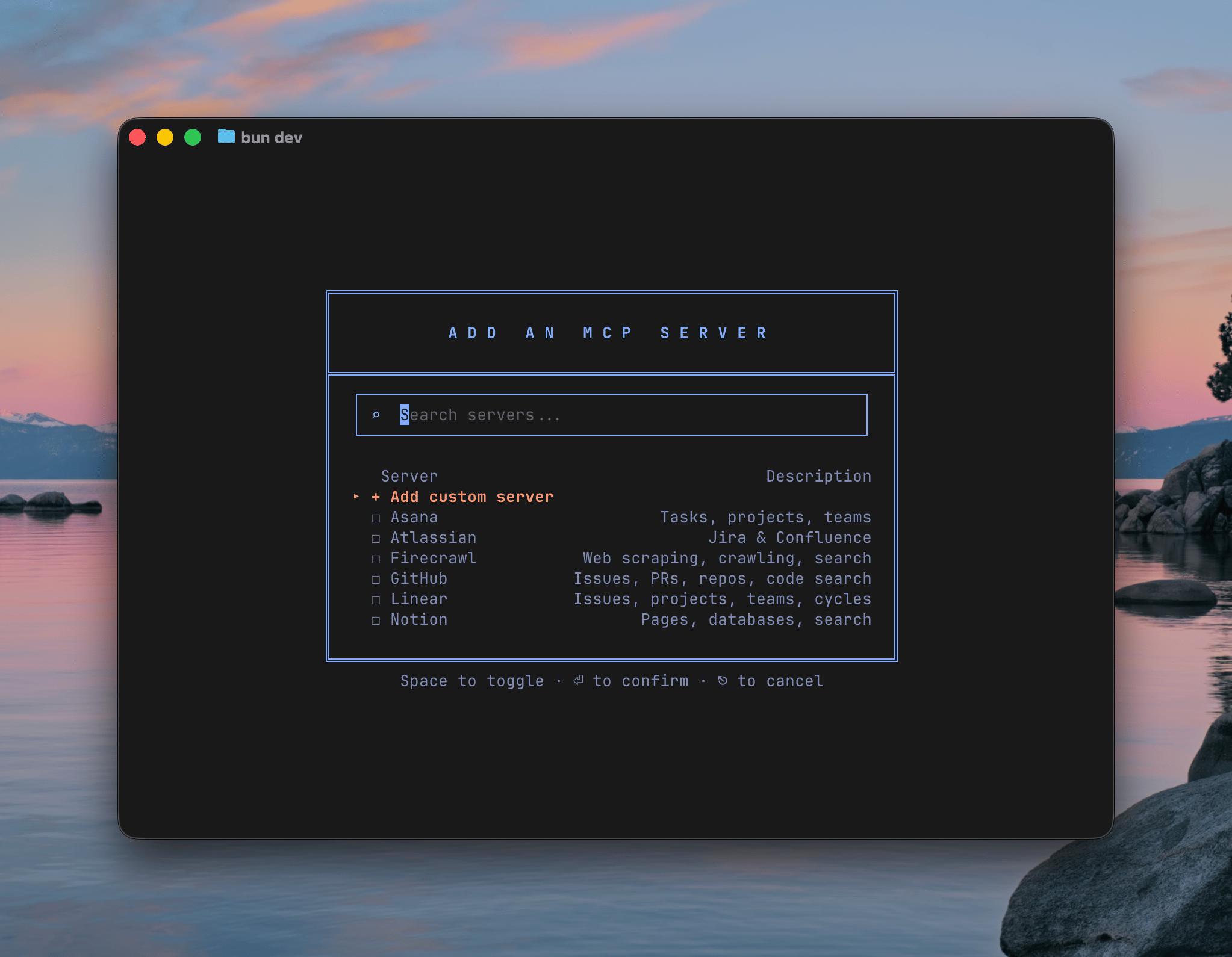
MCP server marketplace with popular integrations like GitHub, Linear, and Notion
Miscellaneous
Enhancements
Enhancements
- Chat and VS Code extension improvements
- Improved @ mention file search parity with TUI
- Improved text handling and CSS for webview UI
- Improved GDB parsing and gdbStateView integration
- Improved terminal diff rendering and modal state handling
- Updated composer popup panel background color
Bug Fixes
Bug Fixes
- Fixed image paste and drag-and-drop bugs
- Fixed bash command confirmation disappearing in VS Code
- Fixed EPERM handling when creating .embedder on Windows
Highlights
This week focused on making developer workflows in the editor and on-device debugging more productive and reliable. Improvements to chat input, rendering, and model discovery help you move from conversation to code faster, while new debugger backends and parsing tools make hardware debug sessions more flexible and easier to understand.New features
VS Code extension: chat input, rendering, and message handling
You can queue messages while an agent is responding so your input is never lost and a pending badge shows queued counts. Code and markdown render more accurately with improved syntax highlighting and clickable file links so you can jump from chat output directly into the editor. Composer shortcuts for bash and serial modes plus layout tweaks keep input focused and readable.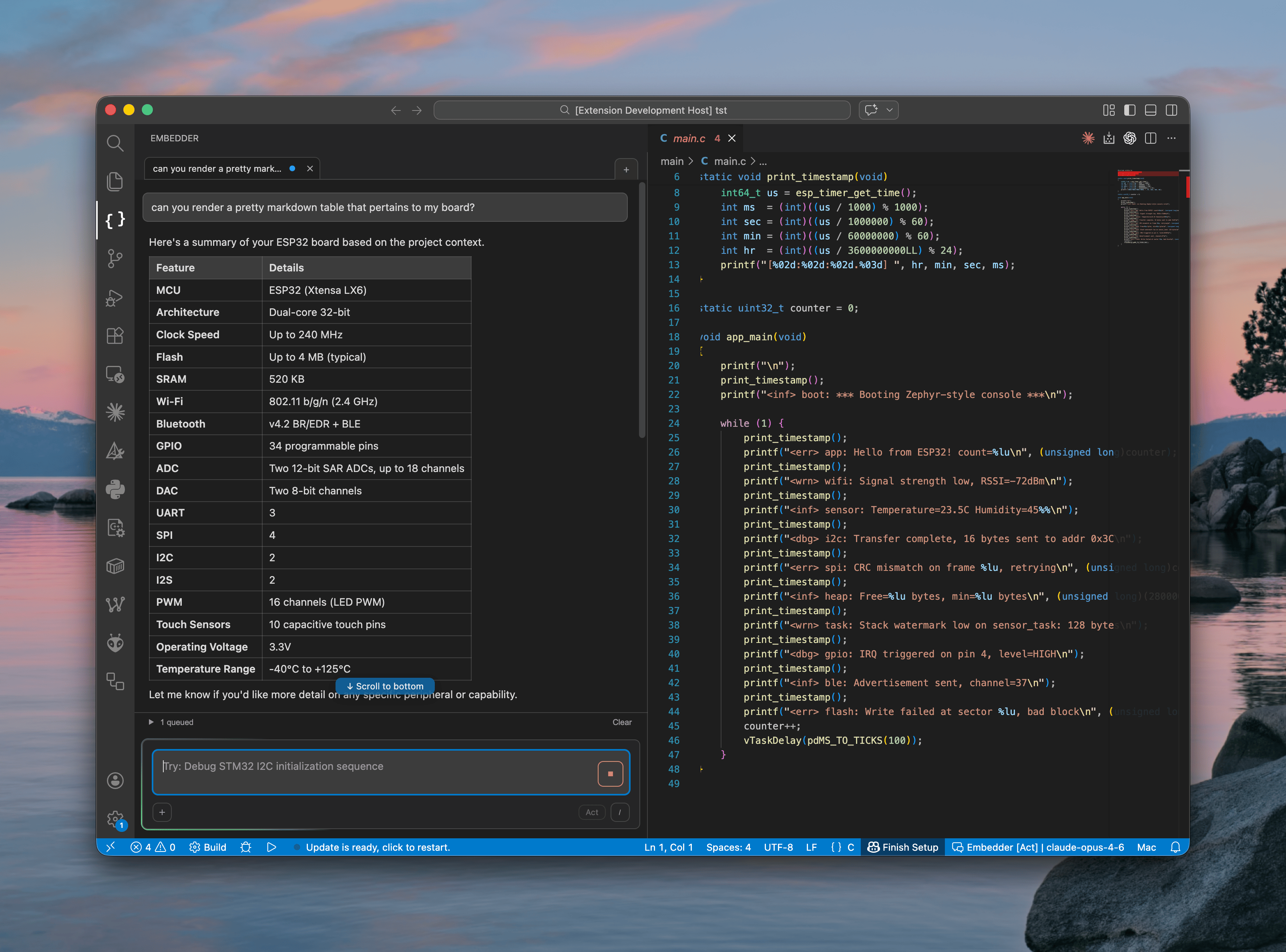
VS Code extension showing markdown table rendering and message queue indicator
GDB and probe backends for device debugging
OpenOCD is available alongside J-Link as a first-class GDB server backend with automatic selection based on project metadata and probe availability, so your debug tooling picks the right backend for the device. Lifecycle management, startup detection, error handling, and RTT integration make sessions more resilient, and enhanced GDB parsing plus a new gdbStateView tool surface clearer debug state for faster troubleshooting.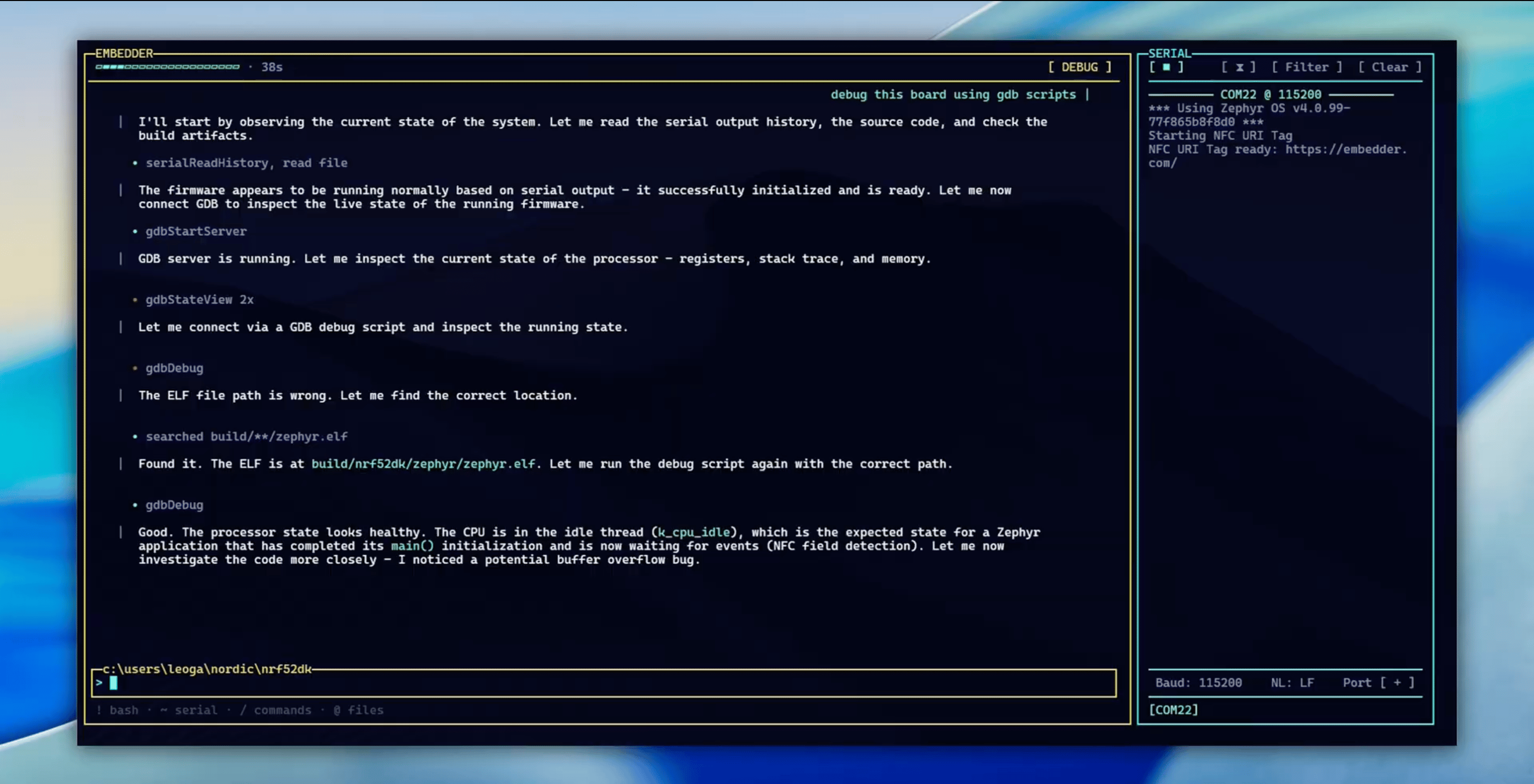
GDB debugging session showing processor state inspection and automatic ELF discovery
Mid-stream compression for long agent turns
Large or long-running agent turns now compress and resume automatically when context thresholds are reached, allowing conversations to continue smoothly across extended reasoning. This reduces interruptions while preserving relevant context so long tasks remain responsive and actionable.Miscellaneous
Enhancements
Enhancements
- Improved model information and search
- Improved serial baud rate controls
- Improved onboarding first-turn context
Bug Fixes
Bug Fixes
- Fixed model response persistence for multi-step tools
- Fixed bash command confirmation in VS Code
- Fixed /init prompt visibility in VS Code
- Fixed Windows serial DLL startup errors
Highlights
This week focused on polishing the developer experience in VS Code and making device workflows more reliable and discoverable. Improvements to message handling, command parity, and serial monitor interactions help you work faster and keep context when switching between editor and device tasks.New features
Serial monitor and device workflows
Serial monitor output streams inline with tool calls and the UI has been simplified for clearer device interaction, including a sensible maximum of serial tabs and updated naming so you can manage monitors more easily. Bash (!) and serial (~) input modes are now available from the Embedder console, letting you quickly switch between and send bash and serial commands.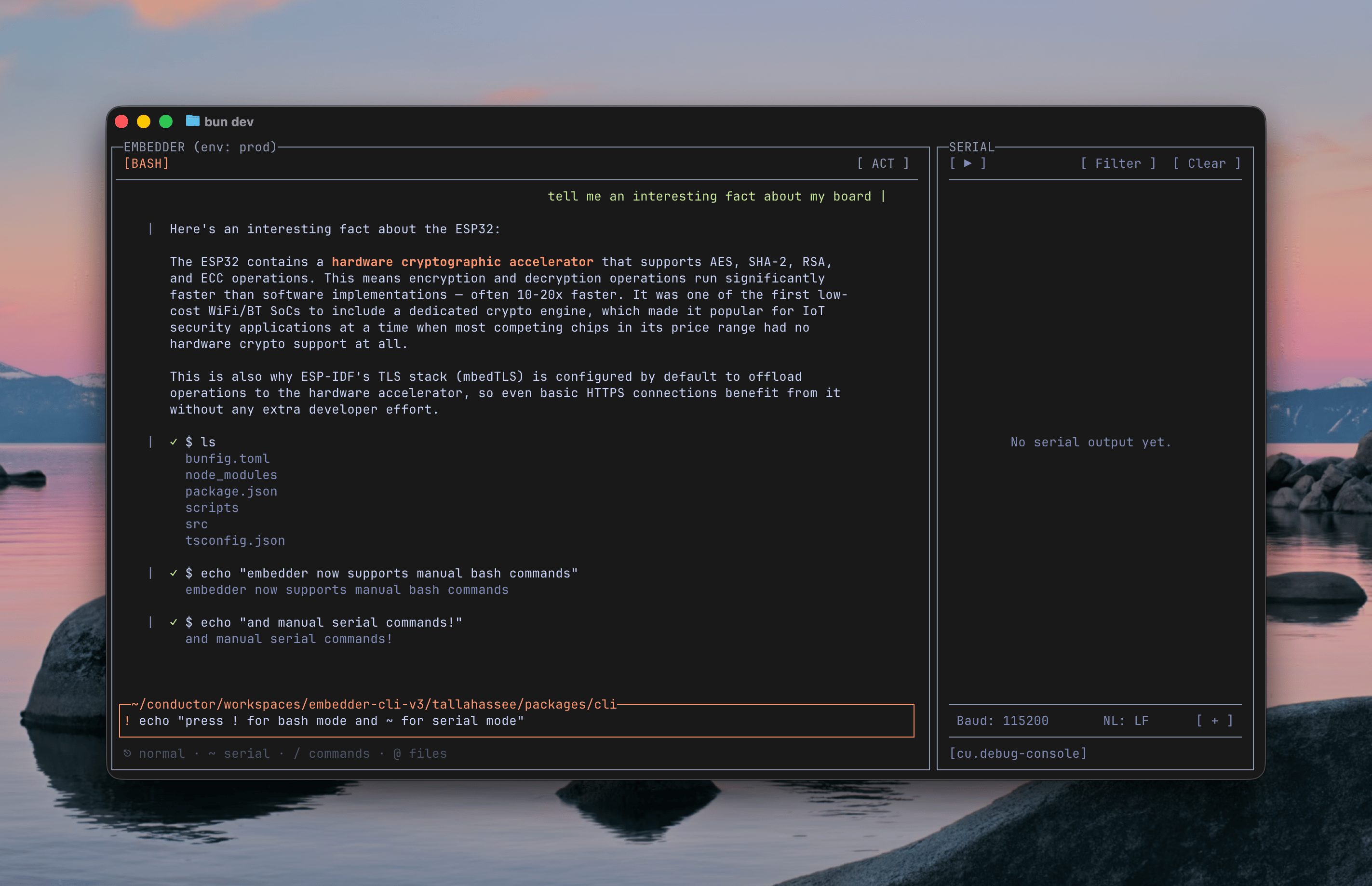
Bash mode lets you run shell commands directly from Embedder
Miscellaneous
Enhancements
Enhancements
- VS Code chat and command experience
- Updated tab loading indicator placement
- Improved models menu display in VS Code
Bug Fixes
Bug Fixes
- Startup and I/O resilience
- Fixed extra blank line before agent text
- Fixed cancelled tool icon for aborted tool calls
Highlights
This week focused on smoothing interactive workflows and device interactions across the CLI and web experience. Improvements to input controls and serial monitoring make everyday tasks faster to perform and easier to verify.New features
Interactive CLI history and controls
You can now navigate previously sent prompts with the Up and Down arrow keys, making it faster to recall and reuse earlier commands. History deduplicates consecutive entries and resets on submit so navigation feels natural, and Ctrl+C now reliably exits from intermediate states for more predictable control.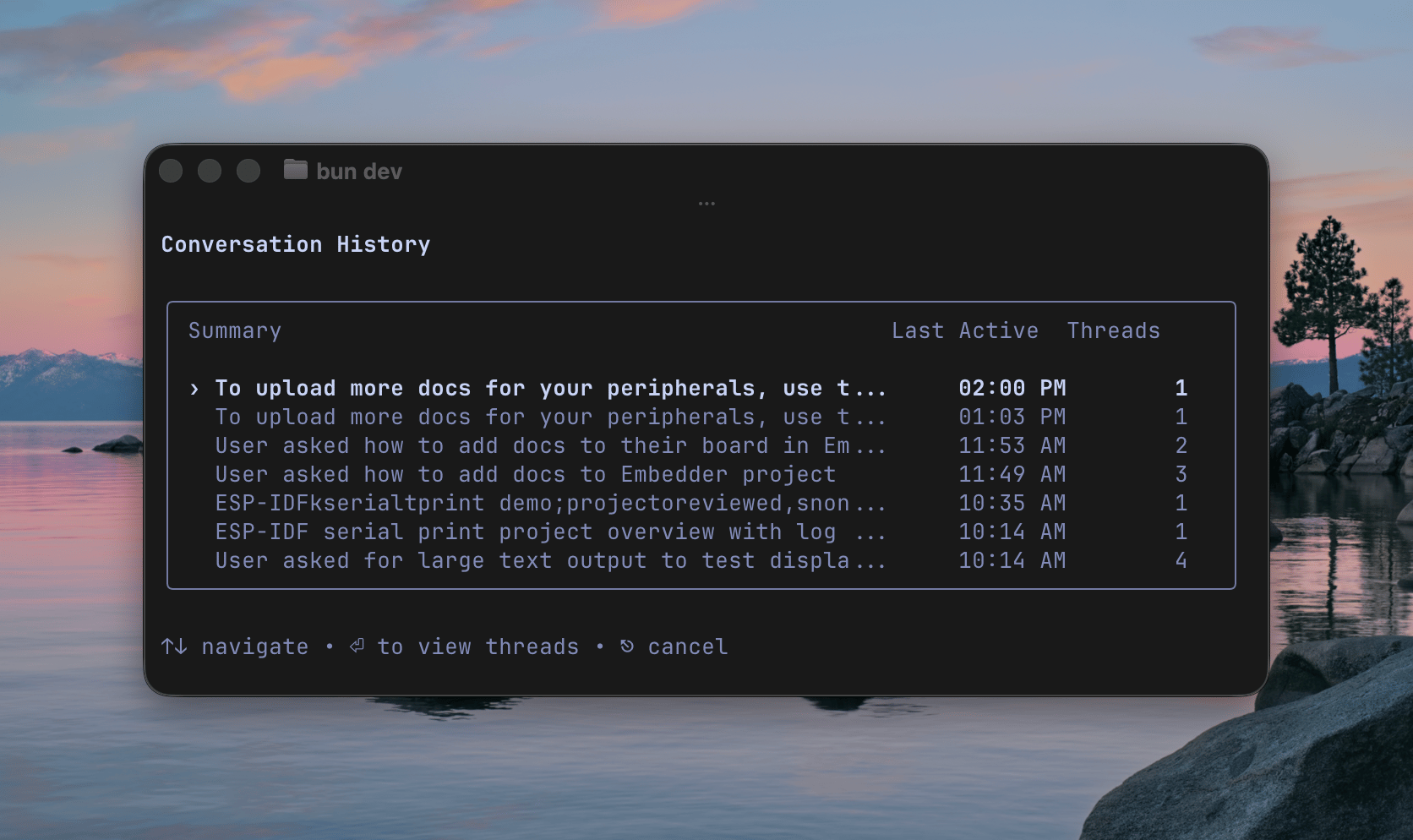
Conversation history showing previous sessions with timestamps and thread counts
Miscellaneous
Enhancements
Enhancements
- Serial monitor and bash mode
- Improved shell tool description for PowerShell on Windows
- Improved line truncation and path display in shell tool
- Improved toolchain path handling
Bug Fixes
Bug Fixes
- Fixed CLI crash
- Fixed 404 on fresh login
Highlights
This week focused on more efficient context handling and refinements to the serial monitor and bash mode, making device interaction smoother and long sessions more reliable.New features
Improved context compression
Conversation context now compresses more efficiently, reducing memory use and helping long sessions stay responsive.Miscellaneous
Enhancements
Enhancements
- Improved shortcut discovery UI
- Corrected baud rate detection
- Improved agent response accuracy
Bug Fixes
Bug Fixes
- Fixed GitHub sync issues
- Resolved serial monitor artifacts
- Fixed Control+W UI bugs
Highlights
This week focused on serial monitoring, sub-agents, and documentation context, plus refinements to the CLI and backend services to make device workflows smoother.New features
Multi-device serial monitoring
You can now monitor multiple serial ports at once, so you can watch a network of connected devices in real time from a single session.Sub-agents
You can now delegate scoped tasks to specialized sub-agents, keeping the main conversation focused while work runs in parallel.Documentation and context enhancements
You can now generate document summaries automatically and include them in context, making it easier to reference documentation within the agent.Enhancements
Enhancements
- Improved CLI handling of large multi-line prompts and scrolling
- Updated platform support for Arduino, Raspberry Pi, Infineon, and Nordic
- Improved error messages for better clarity
- Improved UI across various components
- Improved backend performance and efficiency
Bug Fixes
Bug Fixes
- Fixed serial monitor stability and reliability issues